

A custom built label in a listing title suggests the builder made the PC to order, but the exact parts still come from the seller’s options. Among the best customizable prebuilt gaming PCs, the MAINGEAR MG-1 Platinum pairs an RTX 5070 with a 7800X3D, and the XOTICPC Vision Compact goes further with a Ryzen 7 9800X3D.
Recommended by Us

HYPER CYBER Phantom RTX 5070 Ti Gaming PC
- High-end RTX 5070 TI 16GB graphics configuration
- Fast Intel Core i9 14900K processor
- Generous 64GB DDR5 memory capacity
- Large 4TB NVMe SSD
- Wi-Fi and Windows 11 Home included
- Individual component brands may vary from the reference images
- The listing does not identify the power supply specifications or motherboard model
- At 35 pounds and 22 x 20 x 14 inches, the tower requires a substantial setup area

MAINGEAR MG-1 Ruby RTX 5060 Ti Gaming PC
- Strong configuration for high-refresh 1080p gaming
- 32GB DDR5-6000 memory and a spacious 2TB Gen4 NVMe SSD
- Standard ATX components support straightforward upgrades
- Extensive cooling setup with a 360mm AIO and seven chassis fans
- Clean Windows 11 installation with no unnecessary preinstalled software
- The RTX 5060 Ti has 8GB of graphics memory, which may be restrictive in especially demanding 1440p workloads.
- Wireless networking details are not provided in the listing.
- The 18.7 x 19.6 x 9.05-inch chassis requires a reasonable amount of desk or floor space.
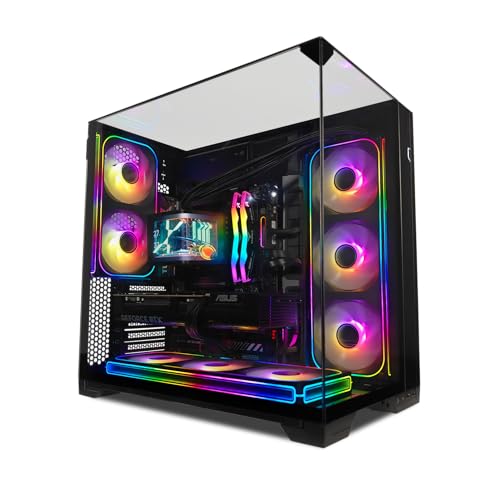
XOTICPC Vision Compact RTX 5080 Gaming PC
- High-end RTX 5080 graphics with 16GB of GDDR7
- Gaming-focused Ryzen 7 9800X3D processor
- Large 4TB total NVMe SSD capacity
- 32GB of modern DDR5 memory
- ARGB AIO water cooler included
- Premium hardware places the system in a costly enthusiast tier
- The listed graphics card brand may vary
- PSU information is inconsistent: the title states 750W, while the features state 850W

HYPER CYBER RTX 5080 Gaming PC
- High-end RTX 5080 graphics with ray-tracing support
- Gaming-focused Ryzen 7 7800X3D processor
- Generous 32GB DDR5 memory and 2TB NVMe storage
- Built-in Wi-Fi and Windows 11 Home included
- Customizable RGB lighting complements the white chassis
- Component brands may vary from the parts shown in product images
- Motherboard, power supply, and connectivity details are not specified
- High-end hardware may be more than mainstream or casual users need

MAINGEAR MG-1 Platinum RTX 5070 Gaming PC
- Strong high-refresh 1440p gaming configuration
- Gaming-focused Ryzen 7 7800X3D processor
- Generous 32GB DDR5-6000 memory and 2TB NVMe storage
- Extensive cooling with a 360mm AIO and seven chassis fans
- Standard ATX hardware improves upgrade flexibility
- The listing does not specify the Wi-Fi standard or wired networking capabilities
- Front and rear port selections are not provided
- The RTX 5070 is described primarily as a 1440p gaming card rather than an uncompromised 4K option
What Customizable Means for a Prebuilt
A customizable prebuilt lets you select certain components from a builder’s available inventory before the computer ships. Depending on the builder, those choices may include the graphics card, processor, memory, storage, case, cooling system, motherboard, and power supply. The builder handles assembly and Windows setup, removing the need to source every component separately. This differs from a fixed configuration, where the listed hardware is predetermined and cannot be changed during checkout. Our guide to gaming PC specs explains how to prioritize those components.
The amount of control varies considerably between sellers. A specialist builder may provide a configurator with several options for nearly every major component, while a retailer may offer separate listings built around predetermined specifications. Some companies also use standard parts that make later upgrades easier, but others may limit the available brands or component combinations. Customization usually takes place on the builder’s own website. Amazon is often more useful for comparing complete configurations that are already defined, including the systems listed on this page.
Note: Many Amazon pages show one fixed configuration rather than a full customization menu. Check the listing for available options, then visit the builder’s website if you want to choose individual components.
What You Can Usually Customize
Most configurators focus on the components that have the greatest effect on performance, capacity, appearance, and cooling.
| Component | What to consider |
|---|---|
| Graphics card | Choose the GPU tier that fits your budget, monitor resolution, and preferred visual settings. |
| Processor | Pick a gaming CPU such as an X3D Ryzen or a Core Ultra, while accounting for streaming and productivity needs. |
| Memory and storage | Choose suitable RAM capacity and speed, along with enough SSD space for your software and game library. |
| Case and cooling | Select the appearance you prefer and a cooler type appropriate for the chosen processor and case layout. |
The same graphics card can appear in systems with very different processors, memory capacities, storage drives, coolers, and power supplies. Compare the entire specification rather than choosing from the GPU name alone. Our CPU and GPU comparison explains how each component affects a gaming system.
How to Choose a Customizable Prebuilt
Start with the performance and features you need, then compare how much control each builder actually provides.
Compare the Builder Options
Not every builder uses the word “custom” in the same way. One may let you choose the processor, graphics card, motherboard, memory, storage, cooling, case, and power supply. Another may present several finished configurations with only minor differences. Review the configuration page carefully and identify which selections can be changed before checkout. A long product title does not necessarily mean that every listed component is selectable or interchangeable.
Also look at whether changing one component restricts another. A larger graphics card may require a different case or power supply, while a higher-power processor may need a more capable cooler. These dependencies are normal, but they affect how much freedom the configurator provides. If you are shopping through Amazon, compare the exact specification shown on each page. Separate listings from the same builder may represent different storage, memory, or processor combinations rather than selectable options.
Check Part Brands
Some builders identify the manufacturer and model of the motherboard, power supply, cooler, memory, and storage drive. This makes it easier to evaluate connectivity, expansion options, efficiency ratings, and upgrade compatibility. XOTICPC, for example, identifies an ASUS TUF GAMING B850M-PLUS WIFI motherboard and an 850W Gold PSU for its Vision Compact configuration. MAINGEAR also states that its featured MG-1 systems use standard ATX hardware, which is useful information for later changes.
Other listings guarantee a component type or performance level while allowing the brand to vary. HYPER CYBER states that component brands may vary, and XOTICPC says the RTX 5080 brand may vary. That arrangement is not automatically a drawback, but it gives you less control over the exact part received. If a specific card design, connector layout, motherboard feature, or power supply model matters to you, confirm it with the seller before ordering.
Read the Warranty
Warranty coverage can differ by builder, seller, and configuration. The XOTICPC Vision Compact listing includes three years of parts and labor coverage plus lifetime technical support. The featured MAINGEAR systems include a one-year limited warranty and lifetime technical support. The Velztorm configurations listed here state a one-year manufacturer warranty from MichaelElectronics2 and describe the computers as professionally upgraded by that seller. These differences can matter when comparing similarly equipped systems.
Check who handles support, which components are covered, and whether shipping costs or service procedures are explained. You should also determine whether replacing or upgrading a component affects coverage. Custom configurations may have different terms from ready-to-ship models, particularly when another seller performs the upgrades. Our prebuilt PC warranty overview covers the main details to examine before placing an order.
Set a Budget First
Customization can increase the total quickly because each upgraded component adds to the final configuration. Begin by choosing a realistic performance target and monitor resolution. Give priority to the graphics card and processor, then select enough memory and storage for your normal use. Extra storage, premium cases, elaborate lighting, and high-end cooling can be appealing, but they should not displace the components that directly support your intended workload.
Leave room for a suitable monitor, peripherals, and any software you need. It can also be sensible to choose a balanced starting configuration and upgrade standard components later. The MAINGEAR MG-1 Ruby and Platinum listings specifically describe standard ATX hardware and straightforward future upgrades. However, later upgrades still require compatibility checks for dimensions, power delivery, motherboard support, and cooling. A configurable system should solve your current needs without relying on uncertain future changes.
Who Should Buy Which System
- Best overall: XOTICPC Vision Compact combines a Ryzen 7 9800X3D, RTX 5080, 32GB DDR5, and 4TB storage.
- Best for the strongest GPU focus: HYPER CYBER Phantom pairs an RTX 5070 TI 16GB with 64GB DDR5.
- Best value: MAINGEAR MG-1 Ruby offers standard ATX hardware, 32GB DDR5, and a 2TB SSD.
- Best alternative brand: HYPER CYBER Ultra White combines a Ryzen 7 7800X3D, RTX 5080, and 360mm ARGB cooling.
- Best runner-up: MAINGEAR MG-1 Platinum features a Ryzen 7 7800X3D and standard ATX components.
Final Thoughts
The right choice depends on whether you want maximum component selection before purchase or an upgrade-friendly fixed configuration. The XOTICPC Vision Compact is our strongest overall recommendation for its high-end specification and stated support coverage.
For a more accessible system based on standard ATX hardware, consider the MAINGEAR MG-1 Ruby. Always verify whether customization occurs on the Amazon page or through the builder directly.
More Options to Consider
- Velztorm iCUE Aciex combines an Intel Core i9-13900K, RTX 5080, 64GB DDR5, and 8TB SSD. It suits buyers who prioritize substantial built-in storage.
- Velztorm Black Praetix Y60 uses an Intel Core i9-14900K, RTX 5080, 64GB DDR5, and Windows 11 Pro. It is an alternative for CPU-heavy multitasking and professional software.
- Velztorm iCUE Aciex 2 has the same listed processor, graphics card, and memory capacity as the larger-storage Aciex option, but includes a 4TB SSD.
FAQs
1. What is a customizable prebuilt gaming PC?
A customizable prebuilt gaming PC is assembled by a system builder but allows the buyer to select some components before shipment. Available choices may include the processor, graphics card, RAM, storage, case, cooler, motherboard, and power supply. The builder manages assembly and operating system setup. The exact level of control depends on the company, and some products described as custom are actually finished configurations offered in several predetermined versions.
2. Can I choose my own parts on a prebuilt?
You can choose parts when the builder provides a configurator, although selections are limited to compatible components in its catalog. Some builders let you change nearly every major part, while others allow only memory or storage adjustments. Amazon pages commonly represent a specific finished build rather than an interactive configurator. Check the seller’s options and the builder’s website before ordering if choosing exact brands and models is a priority.
3. Are custom prebuilts better than fixed ones?
Custom prebuilts are better for buyers who want control over performance, storage, cooling, or appearance without assembling a computer. Fixed systems can be simpler to compare, may ship sooner, and sometimes provide a well-balanced specification without extra decisions. Neither format is automatically superior. The better choice depends on whether the available hardware meets your needs, uses suitable components, includes clear support terms, and leaves a practical upgrade path.
4. How long do custom gaming PCs take to ship?
Shipping time depends on component availability, the builder’s order queue, assembly requirements, and any additional quality checks performed by the company. A ready-to-ship configuration may leave sooner than a system assembled around individual selections. Estimated dates can also change if a chosen component becomes unavailable. Review the current processing estimate before ordering and ask whether substitutions are possible, especially if you need the computer by a particular date.
5. Does customization cost more?
Customization can cost more when you select higher-tier components, additional storage, premium cooling, or a more elaborate case. It can also help you avoid paying for features you do not need by directing the budget toward specific priorities. Compare the completed configuration rather than its starting price. Our overview of prebuilt PC costs explains the factors that affect overall value.









