

Flight simulators reward a strong processor and a lot of memory, and large scenery installs make fast storage worth having. Among the best prebuilt gaming PCs for Flight Simulator, the Velztorm Black Praetix 3D carries an RTX 5080, and the Skytech King 95 is the RTX 5070 Ti pick with 32GB of RAM.
Recommended by Us

Skytech King 95 RTX 5070 Ti Gaming PC
- High-end RTX 5070 Ti 16GB graphics card
- Gaming-focused Ryzen 7 7800X3D processor
- Generous 32GB DDR5-6000 RGB memory
- 360mm AIO liquid cooling with ARGB fans
- Fast Gen4 NVMe storage and included peripherals
- Wi-Fi 5 is older than newer Wi-Fi 6 and Wi-Fi 7 standards.
- A 1TB SSD may fill quickly with a large modern game library.
- The graphics card brand and additional display ports may vary.

HELLOLAND Ocean Park RTX 5070 Ti Gaming PC
- High-end Ryzen 7 9800X3D and RTX 5070 Ti configuration
- Generous 16GB of graphics memory and 32GB of DDR5 RAM
- Two SSDs provide 2TB of combined storage
- 360mm AIO cooling backed by nine ARGB PWM fans
- 850W 80 Plus Gold power supply is listed
- Only half of the storage uses the faster NVMe interface; the second 1TB drive is SATA.
- Wi-Fi and Bluetooth capabilities are not specified in the listing.
- Motherboard model, RAM speed, and individual component brands are not provided.
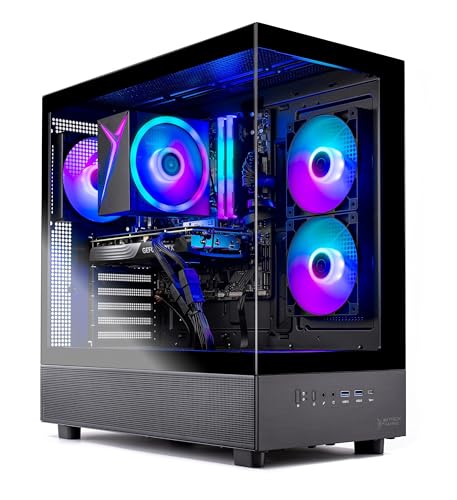
Skytech Azure 3 RTX 5060 Ti Gaming PC
- 16GB RTX 5060 Ti configuration is positioned for high-detail 1440p gaming.
- Ryzen 7 7700 and 32GB of DDR5 memory provide capable core hardware.
- Fast Gen4 NVMe storage is included.
- Tempered-glass case and ARGB fans give the desktop a gaming-focused appearance.
- Keyboard and mouse are supplied in the package.
- Wi-Fi 5 is older than Wi-Fi 6 and Wi-Fi 6E standards.
- The graphics card brand and some additional port details may vary.
- A 1TB drive may require expansion for users with especially large software libraries.

CyberPowerPC RTX 5060 Ti Gaming PC
- RTX 5060 Ti includes a generous 16GB of graphics memory.
- 32GB DDR5 and a 2TB NVMe SSD form a capable gaming and multitasking configuration.
- Liquid CPU cooling is included.
- Strong wired and wireless connectivity, including Wi-Fi 6 and Bluetooth 5.3.
- Keyboard and mouse are supplied with the PC.
- Power supply wattage and efficiency rating are not specified.
- The listing does not identify RAM speed or the installed memory configuration.
- Graphics outputs are limited to one HDMI and two DisplayPort connections.

Velztorm Praetix Y60 RTX 5080 Gaming PC
- High-end RTX 5080 graphics with 16GB GDDR7
- Gaming-focused Ryzen 7 9800X3D processor
- Generous 64GB DDR5 memory configuration
- Fast 2TB PCIe NVMe storage
- Modern Wi-Fi 7 and Bluetooth 5.4 connectivity
- At 35.8 pounds, the tower may be cumbersome to move.
- The listing does not provide the DDR5 memory speed.
- Only one listed storage drive may require expansion for especially large media or software libraries.
What Flight Simulator Needs From a Gaming PC
Flight Simulator is a demanding simulation because it must process detailed aircraft systems, scenery, traffic, weather, and a large visible environment at the same time. A fast CPU helps manage simulation calculations and keeps the experience responsive, while a strong graphics card renders the landscape, cockpit, lighting, and effects. Plenty of memory also helps when the simulation is handling complex scenery or background applications. Our guide to gaming PC specs provides a broader explanation of how these components work together.
Fast storage matters because Flight Simulator installations and scenery libraries can become large, and an NVMe SSD helps with installation, startup, and asset-loading times. Display choice is another major consideration. A conventional monitor places less demand on the system than a high-resolution display, a multi-monitor cockpit, or a VR headset. Those setups increase rendering work and may also place more pressure on the processor as the system prepares additional frames, objects, and simulation data for a wider or more immersive view.
Heads up: Triple monitors or a VR headset multiply the rendering work. Plan the GPU around the display setup you intend to use, not only the settings you use today.
Key Parts for Flight Simulator
A balanced component list is more useful than one impressive specification surrounded by weaker supporting hardware.
| Part | What to Look For |
|---|---|
| CPU | A fast processor with strong single-core performance helps simulations process aircraft systems, scenery, traffic, and other calculations. |
| GPU | A strong graphics card handles detailed visuals, high resolutions, triple-screen arrangements, and the extra rendering demands of VR. |
| RAM | 32GB gives useful headroom for large simulations, detailed scenery, background software, and general multitasking. |
| Storage | A fast NVMe SSD provides responsive storage for large scenery libraries, updates, add-ons, and the main installation. |
The same GPU can appear in listings with different processors, memory capacities, storage configurations, cooling systems, and power supplies. Compare the complete specification rather than shopping by graphics card alone. An imbalanced machine may limit the benefit of its headline component or leave less room for future upgrades. Our bottleneck overview explains why component balance matters.
How to Choose a Prebuilt for Flight Simulator
Start with your display plans, then compare the processor, graphics card, memory, storage, cooling, and upgrade options as one package.
Strong CPU Performance
Flight Simulator leans heavily on the processor because the CPU manages much more than basic player input. It works through simulation behavior, aircraft systems, traffic, environmental activity, and the instructions needed to prepare each scene for the graphics card. Strong single-core performance is especially useful in workloads that cannot distribute every task evenly across many cores. A modern Ryzen 7 or comparable Intel processor is a sensible target when you want consistently responsive simulation performance.
Core count still matters for background tasks, streaming tools, voice software, browsers, and general multitasking, but more cores do not automatically make a processor better for this workload. Look at the processor generation and gaming performance rather than relying only on its core total or maximum advertised clock speed. CPU cooling is also relevant because sustained heat can affect how consistently a processor maintains its performance. Our CPU and GPU comparison explains their different roles.
GPU for Your Displays
The appropriate graphics card depends heavily on the resolution and number of displays you plan to use. A single mainstream monitor is less demanding than a high-resolution panel, three synchronized screens, or a VR headset. Higher visual settings also increase the burden through detailed shadows, reflections, clouds, terrain, and cockpit surfaces. A stronger GPU gives you more flexibility to retain visual detail without making as many compromises, particularly when your display setup contains substantially more pixels.
Graphics memory deserves attention as well, especially for detailed scenery and high-resolution output. These systems include cards ranging from the GeForce RTX 5060 Ti 16GB through the GeForce RTX 5080 16GB. The upper tiers make more sense for ambitious display configurations, while the RTX 5060 Ti systems provide a more accessible starting point. Avoid paying for graphics performance you will not use, but leave reasonable headroom if a monitor or VR upgrade is likely.
Enough RAM
Memory supports scenery data, simulation assets, the operating system, and any software running alongside Flight Simulator. A system with 32GB provides comfortable headroom for a large simulation and normal background tasks without making memory capacity the obvious weak point. Every table product includes at least 32GB of DDR5 memory, while the Velztorm configuration increases that capacity to 64GB. Extra memory is most useful for heavier multitasking, content creation, or unusually large add-on collections.
Capacity should usually come before small differences in advertised memory speed. Once a prebuilt has enough RAM, the processor and graphics card will generally have a more direct effect on the simulation experience. Check whether the motherboard leaves accessible slots if you expect to add memory later. Also confirm that the listing clearly identifies the memory generation and total capacity. Matching modules are preferable when upgrading because they reduce uncertainty around speed, timings, and system compatibility.
Fast Large Storage
Flight Simulator, scenery packages, updates, and community add-ons can consume substantial storage space. An NVMe SSD is the preferred primary drive because it offers fast access without the mechanical delays of a hard drive. A larger drive also reduces the need to constantly move or remove content. Most systems featured here include a 2TB total capacity, although the Skytech King 95 uses a 1TB Gen4 NVMe M.2 SSD, so storage needs deserve attention before buying.
Drive configuration can vary even when the total capacity looks similar. The HELLOLAND system combines a 1TB NVMe SSD with an additional 1TB SATA SSD, while several alternatives provide one 2TB PCIe or Gen4 NVMe drive. A single large NVMe drive is simple to manage, but a second drive can help separate the main installation from other files. Check motherboard expansion options and case access if you expect your scenery library to grow significantly over time.
Who Should Buy Which System
- Best overall: Skytech Azure 3 pairs a Ryzen 7 7700 with an RTX 5060 Ti 16GB and 32GB DDR5.
- Best for the strongest GPU: Skytech King 95 combines an RTX 5070 Ti 16GB with a Ryzen 7 7800X3D.
- Best value: CyberPowerPC 8700F RTX 5060 TI includes 32GB DDR5, a 2TB PCIe NVMe SSD, and RTX 5060 Ti 16GB graphics.
- Best alternative brand: Ocean Park White offers a Ryzen 7 9800X3D, RTX 5070 Ti 16GB, and split SSD storage.
- Best runner-up: Velztorm Black Praetix 3D provides an RTX 5080 16GB, Ryzen 7 9800X3D, and 64GB DDR5.
Final Thoughts
The Skytech Azure 3 is the most balanced overall choice for a mainstream monitor setup, pairing capable graphics with a modern Ryzen 7 processor and 32GB of memory.
Choose the Skytech King 95 when stronger graphics and a gaming-focused Ryzen 7 7800X3D better match your high-resolution, multi-monitor, or VR plans.
More Options to Consider
- CLX Set Core Ultra 7 combines an Intel Core Ultra 7 270K Plus with an RTX 5080, 64GB DDR5, and a 2TB SSD. It suits buyers seeking premium graphics with an Intel processor.
- MAINGEAR MG-1 Emerald uses an RTX 5070 12GB and Intel Core Ultra 5 250K Plus. Standard ATX hardware and a 2TB Gen4 NVMe SSD make it appealing to buyers who value upgrade access.
- MAINGEAR MG-1 Platinum pairs the same RTX 5070 tier with a Ryzen 7 7800X3D. It is an alternative for shoppers prioritizing a gaming-focused AMD processor and clean Windows installation.
FAQs
1. What PC specs do I need for Flight Simulator?
Look for a modern processor with strong single-core performance, a capable graphics card suited to your monitor resolution, and at least 32GB of RAM for comfortable headroom. An NVMe SSD is strongly preferable because the main installation, scenery, and add-ons can require substantial space. The exact GPU tier should reflect whether you use one monitor, multiple screens, or VR. Cooling and component balance matter more than any single headline specification.
2. Is a prebuilt gaming PC good for Flight Simulator?
Yes, a well-configured prebuilt can be a practical choice for Flight Simulator. It arrives as a complete system with Windows, cooling, storage, and supporting hardware already selected, which removes much of the parts-matching work. Compare the full component list, warranty, storage capacity, and upgrade options before ordering. A prebuilt with a strong GPU but a substantially weaker processor may not provide the balanced simulation experience suggested by its graphics card.
3. Is the CPU or GPU more important for Flight Simulator?
Both matter, but they handle different parts of the workload. The CPU processes simulation behavior, aircraft systems, traffic, and scene preparation, while the GPU renders the cockpit, terrain, clouds, lighting, and output for your displays. A fast processor is particularly valuable in this type of simulation, but demanding resolutions, triple monitors, and VR place greater pressure on the graphics card. The best result comes from matching both components to the intended display setup.
4. How much RAM does a gaming PC need for Flight Simulator?
For the systems compared here, 32GB is a sensible capacity that provides headroom for Flight Simulator, the operating system, scenery data, and common background applications. More memory can help users who run creation software, many utilities, or unusually heavy add-on collections at the same time. Capacity is generally the first priority, followed by generation and speed. Our gaming PC memory guide covers the wider tradeoffs.
5. How much should I spend on a PC for Flight Simulator?
Your ideal spending bracket depends on resolution, display count, VR use, and how much visual detail you want to retain. A mid-range system with a modern Ryzen 7 and RTX 5060 Ti 16GB offers a practical starting point, while RTX 5070 Ti and RTX 5080 systems target more demanding displays. Spend first on balanced CPU and GPU performance, then prioritize 32GB of RAM and sufficient NVMe storage. Premium aesthetics should come after the core hardware.









