

Helldivers 2 stresses both the CPU and the graphics card in big fights, so a balanced mid to high end build works best. Among the best prebuilt gaming PCs for Helldivers 2, the Skytech King 95 pairs an RTX 5070 Ti with 32GB of RAM, and the HachimanPC Ronin is the DDR5 option with 32GB.
Recommended by Us

Skytech King 95 RTX 5070 Ti Gaming PC
- High-end RTX 5070 Ti 16GB graphics card
- Gaming-focused Ryzen 7 7800X3D processor
- Generous 32GB DDR5-6000 RGB memory
- 360mm AIO liquid cooling with ARGB fans
- Fast Gen4 NVMe storage and included peripherals
- Wi-Fi 5 is older than newer Wi-Fi 6 and Wi-Fi 7 standards.
- A 1TB SSD may fill quickly with a large modern game library.
- The graphics card brand and additional display ports may vary.

HELLOLAND Ocean Park RTX 5070 Ti Gaming PC
- High-end Ryzen 7 9800X3D and RTX 5070 Ti configuration
- Generous 16GB of graphics memory and 32GB of DDR5 RAM
- Two SSDs provide 2TB of combined storage
- 360mm AIO cooling backed by nine ARGB PWM fans
- 850W 80 Plus Gold power supply is listed
- Only half of the storage uses the faster NVMe interface; the second 1TB drive is SATA.
- Wi-Fi and Bluetooth capabilities are not specified in the listing.
- Motherboard model, RAM speed, and individual component brands are not provided.
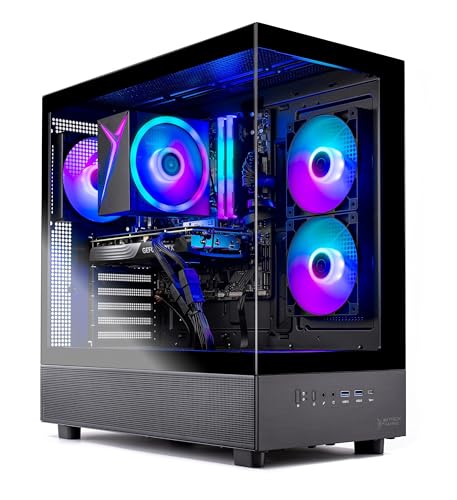
Skytech Azure 3 RTX 5060 Ti Gaming PC
- 16GB RTX 5060 Ti configuration is positioned for high-detail 1440p gaming.
- Ryzen 7 7700 and 32GB of DDR5 memory provide capable core hardware.
- Fast Gen4 NVMe storage is included.
- Tempered-glass case and ARGB fans give the desktop a gaming-focused appearance.
- Keyboard and mouse are supplied in the package.
- Wi-Fi 5 is older than Wi-Fi 6 and Wi-Fi 6E standards.
- The graphics card brand and some additional port details may vary.
- A 1TB drive may require expansion for users with especially large software libraries.

HELLOLAND Panorama RTX 5060 Ti Gaming PC
- Capable RTX 5060 Ti graphics for high-detail 1080p gaming
- Eight-core Ryzen 7 processor and 32GB RAM support demanding multitasking
- Generous 2TB combined SSD capacity
- 240mm liquid cooling and speed-controlled ARGB fans
- Wi-Fi, Bluetooth, and Windows 11 are included
- The RTX 5060 Ti is listed with 8G of graphics memory, which may be limiting for some demanding high-resolution workloads.
- DDR4 memory and the AM4 processor platform are from an older generation.
- The listing does not specify the power supply wattage, motherboard model, or the graphics card brand.

Hachiman PC Ronin RTX 5060 Gaming Desktop
- Modern Ryzen 5 processor and RTX 5060 graphics
- Generous 32GB DDR5-6400 memory configuration
- Fast 1TB PCIe Gen4 NVMe storage
- Wi-Fi 6, Bluetooth 5.3, USB-C, and Ethernet included
- Tower air cooling and ARGB case fans are listed
- The RTX 5060 has 8GB of VRAM, which may be limiting for especially memory-intensive graphics workloads.
- A 1TB drive can fill quickly when storing many large applications or media files.
- The listing does not identify the SSD, memory, motherboard, or power supply manufacturers.
What Helldivers 2 Needs From a Gaming PC
Helldivers 2 is a demanding modern game that can put substantial pressure on a gaming PC during visually busy scenes. A strong graphics card matters most because it handles image quality, resolution, effects, and much of the rendering workload. Plenty of video memory also helps when higher-resolution textures and demanding settings are enabled. A balanced system should pair that graphics hardware with a modern processor instead of spending nearly the entire budget on one component. Our gaming PC specs article explains the broader requirements.
Resolution should shape your hardware choice. Playing at 1080p with moderate settings is less demanding than targeting detailed 1440p or 4K output, so buyers using higher-resolution monitors should prioritize a faster GPU. Helldivers 2 also benefits from a capable CPU that can process gameplay activity without holding the graphics card back. Fast solid-state storage does not directly replace CPU or GPU performance, but it improves startup and loading behavior. Memory capacity matters as well, especially when voice chat, launchers, browsers, or streaming software remain open while playing.
Heads up: Demanding games such as Helldivers 2 can use a lot of VRAM at high settings, so 12GB or 16GB cards give more room than 8GB cards.
Key Parts for Helldivers 2
Focus on a balanced specification rather than one attention-grabbing component.
| Part | What to Look For |
|---|---|
| GPU | A strong graphics card with plenty of VRAM matters most for resolution, visual detail, and demanding effects. |
| CPU | A modern six- to eight-core processor helps keep the graphics card supplied with work during active gameplay. |
| RAM | 16GB is the practical minimum, while 32GB provides headroom for background applications, streaming, and multitasking. |
| Storage | A fast NVMe SSD shortens load times in large games and makes the overall system feel more responsive. |
The same graphics card can appear in prebuilts with very different processors, memory configurations, storage drives, cooling systems, and power supplies. Compare the entire specification rather than selecting a computer from its GPU name alone. Poor component balance can limit the benefit of an otherwise capable card. Our prebuilt bottleneck overview explains what to watch for.
How to Choose a Prebuilt for Helldivers 2
Work through the major components in order, beginning with the hardware that most directly affects visual performance.
Start With the GPU
The graphics card has the greatest influence on the resolution and detail settings you can use comfortably. For a 1080p monitor, a current mid-range card is a sensible starting point. A higher GPU tier becomes more valuable when moving to 1440p, using demanding visual options, or pairing the computer with a high-resolution display. Spending more on graphics can therefore make sense, but only when the monitor and intended settings can use the additional rendering capability.
Compare exact GPU names because small naming differences can represent meaningful changes in speed and memory capacity. These systems range from the GeForce RTX 5060 8GB through the GeForce RTX 5070 Ti 16GB, giving shoppers options for different displays and expectations. The graphics card should still be considered alongside the rest of the computer. Our CPU and GPU comparison covers how these components divide gaming work.
Watch the VRAM
Video memory stores textures, frame data, and other assets the GPU needs while rendering. Higher resolutions and detailed settings generally increase that demand. An 8GB card can be appropriate when cost and 1080p gaming are the priorities, but cards with 12GB or 16GB provide more breathing room. That extra capacity is particularly relevant to shoppers who want higher settings or who expect to keep the same computer through later updates and increasingly demanding software.
Do not treat VRAM capacity as a complete measure of GPU performance. A slower graphics processor does not automatically beat a faster one merely because it has more memory. Consider the GPU model, memory capacity, target resolution, and total system configuration together. Among the table systems, the Skytech Azure 3 has a GeForce RTX 5060 Ti 16GB, while both RTX 5070 Ti configurations provide 16GB. The Hachiman PC Ronin uses a GeForce RTX 5060 8GB.
Pair It With a Good CPU
A modern CPU processes game logic, system tasks, and the instructions needed to keep the graphics card working. A balanced six- or eight-core processor is a practical match for a capable gaming GPU. Faster processors can be useful for high-refresh gaming, streaming, and heavier multitasking, but the graphics card usually deserves priority when visual quality and resolution are the main goals. Avoid choosing an expensive processor if doing so forces a large downgrade in graphics performance.
The listed systems offer several different approaches. The Hachiman PC Ronin pairs its GeForce RTX 5060 8GB with an AMD Ryzen 5 9600X, while the Skytech Azure 3 combines an AMD Ryzen 7 7700 with a GeForce RTX 5060 Ti 16GB. The higher-tier Skytech King 95 uses an AMD Ryzen 7 7800X3D alongside a GeForce RTX 5070 Ti 16GB. These combinations make it easier to choose around workload and monitor demands.
Fast Storage Helps
An NVMe SSD helps Windows, game files, and applications load quickly. Storage speed does not turn a lower-tier graphics card into a faster one, but it improves everyday responsiveness and reduces time spent waiting for large files to open. Capacity matters too because a gaming library, updates, captures, and other media can consume space quickly. A single 1TB drive is a workable starting point, while larger or dual-drive configurations provide more room before storage management becomes necessary.
Check whether a listing uses one fast primary drive or divides capacity between NVMe and SATA storage. The Skytech systems and Hachiman PC Ronin list a 1TB Gen4 NVMe SSD. The Ocean Park desktop combines a 1TB NVMe SSD with an additional 1TB SATA SSD, and the Panaroma desktop also lists 1TB PCIe plus 1TB SATA storage. These dual-drive configurations favor library capacity, while a single-drive setup can be simpler to manage initially.
Who Should Buy Which System
- Best overall: Skytech Azure 3 pairs an RTX 5060 Ti 16GB with 32GB DDR5.
- Best for the strongest GPU: Skytech King 95 combines RTX 5070 Ti 16GB graphics with an AMD Ryzen 7 7800X3D.
- Best value: Panaroma RTX 5060 TI includes RTX 5060 Ti 8GB graphics and two storage drives.
- Best alternative brand: Ocean Park White provides an AMD Ryzen 7 9800X3D and RTX 5070 Ti 16GB.
- Best runner-up: HachimanPC Ronin offers RTX 5060 8GB graphics, 32GB DDR5, and Wi-Fi 6.
Final Thoughts
The Skytech Azure 3 is the strongest all-around recommendation for shoppers seeking a balanced CPU, 16GB graphics card, and 32GB of DDR5 memory. It suits Helldivers 2 without pushing directly into the highest hardware tier.
Choose the Skytech King 95 instead when stronger RTX 5070 Ti graphics and an AMD Ryzen 7 7800X3D better match your resolution and performance goals.
More Options to Consider
- STORMCRAFT Phantom adds an RTX 5080 16GB, AMD Ryzen 7 9800X3D, and 2TB NVMe Gen4 SSD. It suits buyers prioritizing the strongest GPU among these options.
- Cooler Master NR2 Pro fits an RTX 5070 12GB and Intel Ultra 7 265F into a compact 18.25-liter system. It is suited to desks with limited space.
- Alienware Aurora combines RTX 5070 graphics with an Intel Core Ultra 7 265F. Its one-year onsite service makes it an alternative for buyers who value in-person hardware support.
FAQs
1. What PC specs do I need for Helldivers 2?
Start with a current mid-range graphics card, a modern six- to eight-core processor, and at least 16GB of system memory. An NVMe SSD is preferable for quick loading and general responsiveness. Higher resolutions and demanding settings justify a faster GPU with more video memory. For greater multitasking headroom, 32GB of RAM is a worthwhile target, especially if you keep communication, recording, browser, or streaming applications open.
2. Is a prebuilt gaming PC good for Helldivers 2?
Yes, a well-balanced prebuilt can be a practical choice for Helldivers 2. It arrives as a complete system with its processor, graphics card, memory, storage, cooling, power supply, and operating system selected by the manufacturer. You should still examine the full parts list because two computers using the same GPU may have different supporting hardware. Warranty coverage, connectivity, cooling, and storage capacity can also influence which system is the better fit.
3. Is the CPU or GPU more important for Helldivers 2?
The GPU is generally the first component to prioritize because it has the largest effect on resolution, image quality, and demanding graphical settings. The CPU remains important because it processes game activity and supplies work to the graphics card. A weak processor can restrict an otherwise capable GPU, so balance matters. Choose the graphics tier around your monitor, then pair it with a modern six- or eight-core processor rather than overspending on either component alone.
4. How much RAM does a gaming PC need for Helldivers 2?
16GB is a reasonable minimum for a focused gaming setup, while 32GB offers more room for background applications and multitasking. The larger capacity is useful if you run voice chat, browsers, launchers, recording tools, or streaming software alongside Helldivers 2. Memory speed and platform also vary between prebuilts, but capacity is the simplest place to begin. Our gaming PC RAM article provides additional context.
5. How much should I spend on a PC for Helldivers 2?
A mid-range price bracket is the sensible starting point for most players, with more expensive systems aimed at higher resolutions, demanding settings, and heavier multitasking. Spend first on the graphics tier that matches your monitor, then confirm that the processor, memory, storage, cooling, and power supply are appropriate. Paying more for 32GB of RAM and additional SSD capacity can improve convenience, but those upgrades should not come at the expense of the GPU needed for your display.









