

Running many apps at once is about CPU cores and memory, not just graphics power. Among the best prebuilt gaming PCs for multitasking, the AVGPC RTX 5060 TI pairs AMD Ryzen 7 7800X3D with NVIDIA GeForce RTX 5060TI 16G, and the AVGPC RTX 5060 is the lower-cost pick.
Recommended by Us
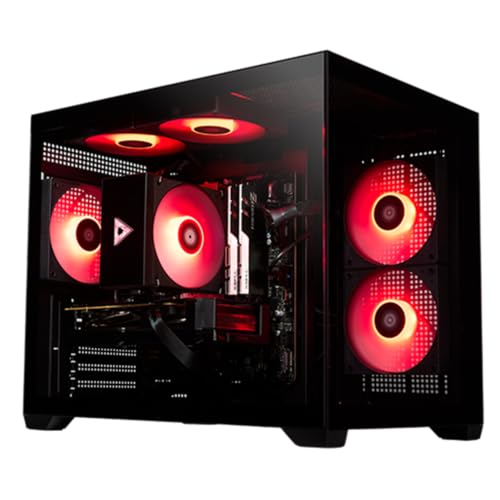
STORMCRAFT Sirius RTX 5060 Ti Gaming PC
- Strong hardware configuration for 1440p gaming and esports
- 16GB GPU memory supports demanding graphics and local AI tasks
- Generous 32GB system memory for gaming, streaming, and multitasking
- Fast 1TB NVMe storage
- B760 platform offers future expansion options
- Power supply wattage and efficiency rating are not specified
- The listing does not identify the DRAM generation or speed
- Built-in Wi-Fi and Bluetooth are not mentioned

AVGPC Hellfire Ryzen 7 RTX 5060 Ti Gaming PC
- Gaming-focused Ryzen 7 7800X3D processor
- RTX 5060 TI graphics card includes 16GB of VRAM
- Generous 32GB DDR5 5200MHz memory configuration
- 360mm AIO liquid cooler and 750W Gold power supply
- Built and supported in the USA
- A 1TB drive may require storage management for especially large media or gaming libraries.
- The listed Wi-Fi/AC connection is not one of the newer Wi-Fi standards.
- The listing does not provide a detailed inventory of external ports.
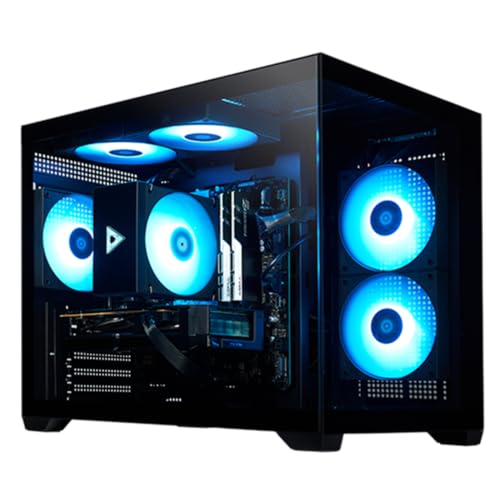
STORMCRAFT Sirius RTX 5070 Gaming PC
- Strong RTX 5070 and i7 14700F configuration for high-performance gaming and content creation
- Generous 32GB DDR5 6000MHz memory
- Fast 1TB NVMe storage
- Modern Wi-Fi 6E, Bluetooth 5.3, and USB-C connectivity
- Keyboard and mouse included
- The operating system is not identified in the provided product data
- Power supply and cooling specifications are not listed
- A 1TB drive may require additional storage for users with large game or media libraries

KOTIN Ultra 7 265KF RTX 5070 Gaming PC
- Strong CPU and GPU configuration for high-resolution gaming and streaming
- Generous 32GB DDR5 memory for multitasking
- Informative built-in system display and customizable ARGB lighting
- Fast PCIe 4.0 NVMe storage
- Modern WiFi 6E and Bluetooth connectivity
- A 1TB SSD may require additional storage for a particularly large game and media library
- The monitor must be connected to the lower graphics card ports rather than the motherboard outputs
- VGA and DVI monitors require a separate HDMI or DisplayPort adapter

AVGPC Max Gaming PC with RTX 5060
- Modern RTX 5060 GPU with 8GB of GDDR7 memory
- Generous 32GB RAM configuration using two 16GB modules
- Eight-core Ryzen 7 processor supports gaming and heavier multitasking
- Wi-Fi, Bluetooth, keyboard, and mouse are included
- DDR4 memory and the B550 platform are from an older hardware generation
- The RTX 5060 has 8GB of graphics memory, which may limit some demanding high-resolution settings
- The listing does not identify the specific motherboard, SSD, power supply, or graphics card manufacturer
What Multitasking Really Requires
Multitasking asks a computer to keep several workloads responsive at the same time. A processor with several capable cores can distribute demanding tasks more effectively, while 32GB of RAM provides space for a game, browser tabs, voice chat, streaming tools, and background applications without constant competition for memory.
Fast storage also matters because games, project files, application caches, and the operating system may all need data at once. An NVMe SSD improves startup, loading, and file access, although it cannot compensate for insufficient memory or an underpowered processor. Our guide to gaming PC specs explains the broader hardware balance.
A gaming PC can usually handle productivity and multitasking well when its parts are evenly matched. Additional spending is most useful when it adds CPU resources, memory capacity, GPU capability for accelerated work, or enough storage for a growing library. Cosmetic lighting generally matters less than these core components for everyday responsiveness.
Multitasking Myths Explained
More CPU Cores Always Mean Faster Gaming
Additional cores help when streaming, rendering, compressing files, or running several demanding applications beside a game. Gaming performance also depends on per-core speed, processor architecture, cache behavior, and the game itself. The practical goal is not simply the largest core count. It is a processor with enough parallel capacity for background work and strong performance in tasks that favor fast individual cores.
Basic Memory Is Enough for Everything
A modest memory capacity can run a game or everyday applications, but combining them changes the requirement. Browser tabs, launchers, communication tools, recording utilities, and creative programs can consume substantial memory together. A 32GB configuration gives these tasks more room and reduces the chance that the system must frequently move active data between RAM and slower storage. Our gaming RAM guide covers capacity in more detail.
Worth knowing: 32GB of RAM gives the most room for many apps and browser tabs at once. It is a sensible target for a gaming PC that will regularly handle mixed workloads.
The GPU Only Matters for Games
A strong graphics card is central to gaming, but compatible creative, rendering, video, and AI applications can also use GPU acceleration. That makes the GPU relevant to both sides of a mixed workload. Video memory capacity can matter when handling detailed visual projects, although the best choice still depends on whether the buyer spends more time gaming, creating content, or running CPU-heavy work.
Any SSD Solves Storage Demands
An SSD improves responsiveness, but speed and capacity remain separate concerns. A fast drive can load data quickly, while a roomy drive determines how many games, recordings, media files, and active projects fit without frequent cleanup. One terabyte is practical for a starting library, whereas two terabytes provides more breathing room. Buyers should also check whether the motherboard offers expansion options for later storage additions.
Core Hardware That Matters Most
Processor Capacity and Responsiveness
The CPU coordinates the game and most background activity, so it deserves close attention in a multitasking system. Several cores and threads help divide streaming, encoding, browser, communication, and productivity work. Strong per-core performance remains valuable for gaming and applications that do not spread evenly across many cores. Neither specification should be considered alone. Our CPU and GPU comparison explains how their roles differ.
Memory Capacity and Generation
For this workload, 32GB is the most useful common capacity among these systems. It provides headroom for a modern game and several supporting applications without making the user close useful background tools. DDR5 configurations offer a newer memory platform, while DDR4 can still support capable multitasking when capacity is sufficient. Memory speed is only one part of performance, so buyers should prioritize adequate capacity before chasing small specification differences.
Storage Speed and Available Space
Fast NVMe storage keeps startup, game loading, file searches, and application launches responsive. Capacity becomes equally important when one computer holds large games, captured footage, source media, and completed projects. A 1TB SSD may be sufficient for a carefully managed library, but a 2TB drive requires less immediate cleanup. Extra spending on storage is especially useful for creators who keep local project files rather than moving them regularly to another drive.
Checks Before Placing an Order
- Will the processor handle your busiest combination of gaming, streaming, browser activity, and creative work, rather than just one task in isolation?
- Does the system include 32GB of RAM, and is that memory capacity more valuable to your workload than spending the same budget on a small graphics upgrade?
- Is the SSD large enough for your current games and project files, with reasonable room left for updates, recordings, and future applications?
- Are cooling, wireless connectivity, ports, support, and upgrade options clearly listed, so the tower fits your desk setup and longer-term plans?
Balanced specifications reduce the chance that one weaker component limits the rest of the computer. Our PC bottleneck guide explains what to watch for when comparing complete systems.
How the Main Systems Compare
The STORMCRAFT Sirius Gaming PC RTX 5070,i7 pairs the Intel i7 14700F, which has 20 cores and 28 threads, with an RTX 5070 12GB, 32GB DDR5 6000MHz memory, and a 1TB NVMe SSD. The KOTIN Gaming PC Desktop, Ultra 7 265KF uses the Intel Ultra 7 265KF with the same listed RTX 5070 12GB class and 32GB DDR5, plus a 1TB PCIe 4.0 NVMe SSD. KOTIN also lists a 240mm liquid cooler and an 850W 80 PLUS Gold power supply.
The STORMCRAFT Sirius Gaming PC i7 14700F takes a different graphics approach by combining that processor with the RTX 5060 Ti 16GB. It has 32GB DRAM and a 1TB NVMe SSD, making its additional listed video memory notable for visual workloads. The AVGPC Hellfire Gaming PC AMD Ryzen 7 7800X3D also includes an RTX 5060TI 16G, along with 32GB DDR5 5200MHz, a 1TB NVME M.2 SSD, a 360mm AIO liquid cooler, and a 750W Gold power supply.
The AVGPC Max Gaming PC – AMD RYZEN 7 5700X 8-Core is the value-oriented configuration here, pairing its eight-core processor with a GeForce RTX 5060 8GB, 32GB DDR4 3200MHz, and a 1TB M.2 NVMe SSD. It uses a heat-pipe CPU cooler and a 650W Gold power supply. All five provide 32GB of system memory, so the most meaningful differences for multitasking are processor resources, memory generation, GPU capability and video memory, cooling, and storage capacity.
Practical Multitasking Questions
1. What specifications suit gaming and multitasking together?
Look for a capable multicore processor, 32GB of RAM, an NVMe SSD, and a graphics card appropriate for your gaming resolution and visual workloads. These components need to be balanced. A very powerful GPU will not solve limited memory or a processor that struggles with several demanding background tasks.
2. Can a gaming PC handle everyday productivity well?
Yes. Gaming desktops generally include processors, dedicated graphics cards, and fast storage that also work well for office applications, browsing, communication, and many creative tasks. Multitasking quality depends on the specific configuration, however, with memory capacity and CPU capability playing especially important roles when numerous programs stay open.
3. Is 32GB of RAM excessive for mixed workloads?
Not for a user who regularly combines gaming with streaming tools, many browser tabs, communication apps, or creative software. It provides useful headroom and reduces pressure on storage-based virtual memory. Lighter users may need less, but 32GB is a sensible capacity for the systems and use case covered here.
4. Should I prioritize the CPU or graphics card?
Prioritize the CPU when your background work includes heavy encoding, compilation, compression, or several demanding applications. Give the GPU more weight when high-detail gaming, GPU rendering, video effects, or compatible AI workloads are central. Most buyers should avoid an extreme imbalance and choose strong components on both sides.
5. Is DDR5 necessary for a multitasking gaming PC?
DDR5 is not strictly necessary because a well-configured DDR4 system with enough capacity can still multitask effectively. DDR5 systems provide a newer platform and higher listed memory speeds in several models here. Our DDR4 and DDR5 guide provides a closer comparison.
6. Is a 1TB SSD enough for games and project files?
It can be enough when the library is managed carefully, but games, recordings, and source media can fill it faster than expected. A 2TB drive offers more convenient breathing room. If choosing a 1TB system, check the listed motherboard expansion options or plan to use an additional internal or external drive later.
Our Multitasking Verdict
The STORMCRAFT RTX 5070 is the strongest all-around recommendation for combining gaming, streaming, and general multitasking, thanks to its balanced CPU, GPU, DDR5 memory, and NVMe storage. The AVGPC RTX 5060 TI is a compelling alternative for buyers who prefer an AMD gaming processor, a graphics card with 16GB of video memory, and a 360mm liquid cooler.
Other Systems Worth Considering
CyberpowerPC RTX 5070 TI combines an AMD Ryzen 7 9800X3D with a GeForce RTX 5070 Ti 16GB, 32GB DDR5, and a 2TB PCIe 4.0 NVMe SSD. It suits buyers seeking stronger graphics hardware and more included storage than the main table configurations.
msi Aegis R2 is a renewed option with an Intel Core Ultra 9 285, NVIDIA GeForce RTX 5070 Ti, 32GB DDR5 6000 memory, and a 2TB M.2 NVMe Gen4 SSD. It is worth considering when processor capability and larger included storage take priority over buying a new-condition system.
Evounic RTX 5050 pairs an eight-core Intel Core i7-11700F with an RTX 5050 8GB, 32GB DDR4, and a 1TB NVMe SSD. It fits buyers with lighter graphics demands who still want substantial memory, liquid CPU cooling, WiFi 6, and Bluetooth 5.4.









