

Roblox runs on almost any gaming PC, so this is a place to save money. Among the best prebuilt gaming PCs for Roblox, the STGAubron RTX 3050 comes with 32GB of RAM, and the Qehi RX 580 is the lower-cost pick.
Recommended by Us

STGAubron RTX 3060 Ti Gaming Desktop
- RTX 3060 Ti graphics offer a capable option for mainstream gaming and esports
- Includes 16GB of memory and a 512GB SSD
- Wi-Fi 6, Bluetooth 5.0, Ethernet, HDMI, and DisplayPort are listed
- RGB keyboard and mouse are included
- Ships with Windows 11 Home 64-bit
- The exact Intel Core i7 generation is not identified
- Memory type, memory speed, and SSD interface are not specified
- A 512GB SSD may feel limited for users with large game or media libraries

STGAubron RTX 3050 Gaming PC
- Entry-level RTX graphics with 6G of listed video memory
- Generous 32GB memory capacity
- Modern Wi-Fi 6 and Bluetooth 5.0 connectivity
- Includes an RGB keyboard and mouse
- Ships with Windows 11 Home 64-bit
- The exact Core i7 generation and model are not specified
- A 512GB SSD may feel limited after installing several large applications
- The listing does not specify the RAM type, SSD interface, or power supply wattage

DeXwtzfn i7 GTX 1660 Super Gaming PC
- GTX 1660 SUPER includes 6GB of graphics memory for mainstream 1080p gaming.
- 16GB of RAM supports general multitasking and content-creation workloads.
- Includes a 512GB SSD and Windows 11 Home 64-bit.
- WiFi 6, Bluetooth 5.3, Ethernet, USB, and dedicated graphics outputs provide flexible connectivity.
- ARGB fans and a temperature display add useful visual features.
- The graphics card may arrive separately and require installation before the first startup.
- The exact i7 processor generation and model are not specified.
- A 512GB SSD can become restrictive for users maintaining a large game or media library.
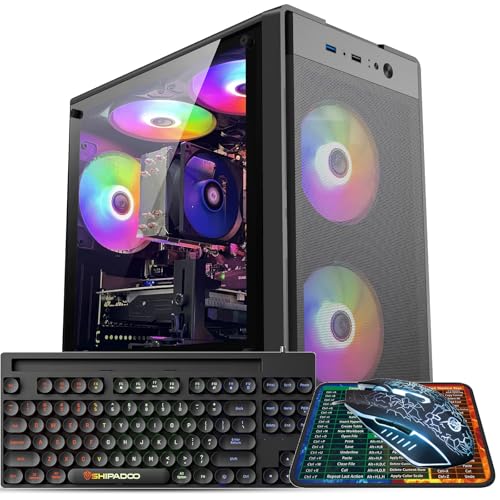
Kroteaup Ryzen 5 5500 RX 590 Gaming PC
- Dedicated RX 590 graphics card includes 8GB of GDDR5 VRAM
- Ryzen 5 processor and 16GB of DDR4 RAM cover gaming and general productivity
- Multiple video outputs support a broad range of monitor connections
- Five RGB fans and built-in Wi-Fi are included
- Comes with a keyboard, mouse, mouse pad, and graphics card holder
- The RX 590 is an older budget-class GPU and may require reduced settings in demanding newer software
- A 512GB SSD can fill quickly after installing several large applications or games
- The listing does not specify the operating system, motherboard, power supply, or storage interface

Qehi Gaming PC with Core i7 and RX 580
- Dedicated RX580 8GB graphics are appropriate for casual 1080p gaming and esports use.
- 16GB RAM and a 512GB SSD cover common gaming, school, home, and office workloads.
- Built-in Wi-Fi 6 avoids the immediate need for a separate wireless adapter.
- Six RGB fans and a tempered-glass side panel create a distinctive desktop setup.
- The listing indicates support for future memory and storage expansion.
- The Core i7 7700 and RX580 are older-generation components compared with current gaming hardware.
- The listing does not specify the operating system, power supply wattage, or available external ports.
- A 512GB SSD may require expansion for users with large game or media libraries.
What Roblox Needs From a Gaming PC
Roblox is not as hardware hungry as the newest visually demanding PC releases. An entry-level or mid-range gaming desktop with a dedicated graphics card, 16GB of RAM, and an SSD should provide a responsive experience while leaving room for voice chat, browser tabs, and background applications. Processor performance still matters because individual Roblox experiences can differ in complexity, but you do not need a premium workstation-class CPU. Our overview of gaming PC specs explains how these components work together.
A much larger GPU can provide extra headroom, especially if you use a higher-resolution display or play more demanding titles, but the improvement inside Roblox may be less noticeable than it would be in graphics-heavy games. A balanced combination of CPU, GPU, memory, and storage is generally more useful than putting most of the budget toward graphics alone. These systems all include dedicated graphics, SSD storage, and at least 16GB of memory, making them more appropriate than basic office desktops that rely entirely on integrated graphics.
Note: Roblox runs well on modest hardware, so a budget or entry-level gaming system is usually the best value. Spend more only when you also need extra performance for other games, streaming, or creative applications.
Key Parts for Roblox
Focus on balanced core components rather than choosing a PC by its graphics card name alone.
| Part | Suggested Tier | Why It Matters |
|---|---|---|
| GPU | Entry-level or mid-range dedicated card | A dedicated card is plenty for Roblox and provides steadier graphics performance than integrated graphics. |
| CPU | Modern quad-core or six-core processor | A capable processor helps with game logic, busy experiences, background software, and general system responsiveness. |
| RAM | 16GB | This is a comfortable capacity for playing while keeping a browser, chat software, or other everyday applications open. |
| Storage | 512GB to 1TB SSD | An SSD supports quick startup and loading while providing practical space for Windows, applications, and a broader game library. |
The same graphics card can appear in prebuilts with different processors, memory capacities, storage drives, connectivity, and power supplies. Compare the entire specification list instead of assuming two systems with similar GPU names will offer the same overall experience. Component balance can also affect upgrades and performance outside Roblox. Our prebuilt bottleneck guide covers common mismatches to watch for.
How to Choose a Prebuilt for Roblox
Start with the performance you actually need, then check the complete specification list and any setup requirements.
Do Not Overspend
Roblox works well on relatively modest gaming hardware, so buying the most powerful graphics card available is rarely necessary for this game alone. Entry-level and mid-range systems can provide the dedicated graphics, sufficient memory, and responsive storage needed for comfortable everyday play. A balanced machine may also leave more of your budget available for a good monitor, keyboard, mouse, headset, or a larger storage drive instead of concentrating every dollar on graphics performance you may not notice.
Paying more makes sense when the computer will serve additional purposes. Streaming, video editing, heavy multitasking, high-resolution displays, and more demanding games can benefit from stronger processors or graphics cards. Before moving into a higher tier, make a list of everything the PC needs to run and separate essential tasks from possible future interests. Our gaming PC advice offers a broader way to match a system with your actual workload.
Choose a Dedicated GPU
A dedicated graphics card has its own graphics resources and memory, giving it a clearer performance role than integrated graphics that share system resources. For Roblox, even an entry-level dedicated card can be a sensible starting point. It can help maintain smoother visual performance when an experience becomes busy, the display resolution increases, or background applications remain open. Every table product includes a dedicated graphics card, although the specific GPU tier differs considerably among the available systems.
Do not assume that the newest or most expensive GPU is automatically the best purchase for this particular use. The RX 580 8GB, RX 590 8GB, GTX 1660 SUPER 6GB, GeForce RTX 3050 6G, and GeForce RTX 3060Ti 8G configurations all exceed the basic idea of an office PC using integrated graphics. Compare their accompanying processor, RAM, SSD, wireless connectivity, and included accessories before deciding which complete package better fits your desk and wider gaming plans.
16GB RAM Is Enough
For a Roblox-focused gaming PC, 16GB of RAM is a comfortable target. It gives Windows, the game, and common background applications practical breathing room without pushing the system into an unnecessarily expensive memory configuration. It is also the capacity included with most systems in this roundup. Buyers who mainly play, browse the web, use voice chat, and complete school or office tasks are unlikely to need a large memory upgrade specifically for Roblox.
More RAM becomes useful when you regularly keep many demanding programs open together. Streaming tools, creative software, large browser sessions, and heavier productivity workloads can consume memory even if the game itself remains light. The STGAubron RTX 3050 configuration includes 32GB, while the other table systems list 16GB. Capacity is not the only consideration, but it is the clearest point of comparison when listings do not provide complete memory timing or upgrade details.
Plan for Other Games
A computer purchased for Roblox may eventually be used for other games or creative work, so consider those workloads before choosing the least powerful option. If Roblox is the main priority, an RX 580 8GB or RX 590 8GB configuration can be a practical value-oriented choice. A GTX 1660 SUPER 6GB offers a stronger middle ground, while the GeForce RTX 3050 6G and GeForce RTX 3060Ti 8G systems provide additional graphics capability for broader use.
Storage deserves similar planning. A 512GB SSD is adequate for Windows, Roblox, common applications, and a modest collection of files, but space can disappear quickly when you add larger games or video projects. The table systems all list 512GB storage, so buyers expecting a broad library should examine upgrade options carefully. Also compare monitor outputs, networking, Bluetooth, included peripherals, cooling information, and any first-use setup instructions disclosed by the manufacturer rather than judging the tower only by appearance.
Who Should Buy Which System
- Best overall: DeXwtzfn GTX 1660 Super pairs GTX 1660 SUPER 6GB graphics with 16GB RAM, a 512GB SSD, and WiFi 6.
- Best for the strongest GPU: STGAubron RTX 3060 Ti includes GeForce RTX 3060Ti 8G graphics, 16GB memory, and Wi-Fi 6.
- Best value: Qehi RX 580 combines RX580 8GB graphics, 16GB memory, a 512GB SSD, and six RGB fans.
- Best alternative brand: STGAubron RTX 3050 provides GeForce RTX 3050 6G graphics, 32GB memory, Wi-Fi 6, and Bluetooth 5.0.
- Best runner-up: Kroteaup RX 590 uses a Ryzen 5 5500, RX 590 8GB, 16GB RAM, and five RGB fans.
Final Thoughts
The DeXwtzfn GTX 1660 Super is the most balanced choice for Roblox, combining dedicated GTX 1660 SUPER 6GB graphics with 16GB RAM and SSD storage. It offers useful headroom without moving directly to the strongest GPU tier.
Choose the STGAubron RTX 3060 Ti if graphics performance for other uses is a major priority. Otherwise, a more modest configuration can run Roblox well while providing better overall value.
More Options to Consider
- WIWB RTX 3050 combines an eight-core Ryzen 7 4700LE with GeForce RTX 3050 8GB graphics and a 512GB NVMe M.2 SSD. It suits multitaskers who want more CPU cores and 8GB of dedicated graphics memory.
- WIWB RX 560 uses a six-core, 12-thread Ryzen 5 4500 and RX 560 4GB graphics. It is a modest alternative for Roblox, schoolwork, office tasks, and buyers who value a compact, quiet design.
- Ryzen 5 5500 RX 580 Build pairs a Ryzen 5 5500 with Radeon RX 580 8GB graphics, liquid cooling, and a 1TB NVMe SSD. It suits buyers who want more included storage and a white chassis.
FAQs
1. What PC specs do I need for Roblox?
A sensible Roblox gaming PC should have a capable quad-core or six-core processor, a dedicated entry-level or mid-range graphics card, 16GB of RAM, and an SSD. A 512GB drive is a practical starting point, while 1TB provides more room for additional games and personal files. Roblox does not generally require premium components, so prioritize a balanced specification rather than choosing the most powerful GPU while overlooking memory, storage, or processor quality.
2. Is a prebuilt gaming PC good for Roblox?
Yes, a prebuilt gaming PC is a convenient option for Roblox because it arrives with the main components selected and configured as a complete system. It removes the need to choose every part separately, although buyers should still read the listing for setup notes. For example, the DeXwtzfn model says its graphics card may ship separately and require installation. Compare the processor, dedicated GPU, RAM, SSD capacity, connectivity, and support information before ordering.
3. Is the CPU or GPU more important for Roblox?
Both components matter, but Roblox usually benefits more from a balanced CPU and GPU than from spending heavily on either part. The processor handles game logic and background tasks, while the graphics card renders the visual output. A modern quad-core or six-core CPU paired with an entry-level or mid-range dedicated GPU is a sensible combination. Our CPU and GPU comparison explains their different roles in more detail.
4. How much RAM does a gaming PC need for Roblox?
For Roblox and normal everyday multitasking, 16GB of RAM is a comfortable amount. It provides room for the game, Windows, browser tabs, voice chat, and common background applications without making excessive memory capacity a priority. Moving to 32GB can help people who stream, edit media, or keep heavier software open while playing. Extra RAM does not automatically improve graphics performance, so do not choose memory capacity while ignoring the processor and dedicated graphics card.
5. How much should I spend on a PC for Roblox?
A budget or entry-level gaming PC is usually sufficient when Roblox is the main purpose. Look for a balanced configuration with dedicated graphics, 16GB of RAM, and SSD storage rather than paying for the strongest GPU available. A mid-range system is easier to justify when you also plan to play more demanding games, stream, edit video, or use a higher-resolution monitor. Spending more for Roblox alone often provides smaller practical gains than improving peripherals, storage capacity, or display quality.









