

Starters do not need the biggest spec sheet, only a dedicated graphics card that will last a few years. Among the best prebuilt gaming PCs for starters, the Qehi RTX 5060 is the modern pick and the Qehi RTX 3050 is the lower-cost way in.
Recommended by Us

WIWB RTX 5060 Ti Ryzen 7 Gaming PC
- Capable graphics configuration for 1080p and 1440p gaming
- Eight-core, 16-thread processor supports demanding multitasking
- Fast 1TB NVMe storage is included
- WiFi 6 and Gigabit Ethernet are built in
- Multiple display connections and extra drive bays add flexibility
- The listing does not specify the power supply, cooling system, or operating system.
- Its 8GB of graphics memory may require adjusted settings in particularly memory-intensive workloads.
- 16GB of DDR4 RAM is adequate for mainstream use, but heavy content creation may benefit from more memory.

KOTIN Gaming PC with RTX 5060 Ti
- RTX 5060 Ti graphics target both high-FPS 1080p and 1440p gaming.
- Fast 1TB Gen4 NVMe storage offers a useful combination of speed and capacity.
- Four DIMM slots and two M.2 slots provide clear memory and storage expansion paths.
- Wi-Fi, Bluetooth, HDMI, and DisplayPort support are included.
- Windows 11 Home comes pre-installed for a straightforward initial setup.
- The system uses DDR4 rather than newer DDR5 memory.
- 16GB of RAM may eventually need an upgrade for heavier multitasking or demanding creative workloads.
- The graphics card has 8GB of VRAM, which can require adjusted texture settings in more demanding 1440p workloads.

Qehi Ryzen 7 RTX 5060 Gaming PC
- RTX 5060 8GB graphics support 1080p and 1440p gaming, ray tracing, and creative acceleration.
- Eight-core, 16-thread Ryzen 7 processor supports demanding multitasking and content creation.
- Fast 1TB NVMe storage provides practical capacity for games and everyday files.
- Six RGB fans, Wi-Fi 6, Gigabit LAN, and varied display connections are included.
- The 16GB DDR4 configuration may be restrictive for especially heavy creative workflows or extensive multitasking.
- DDR4 memory is used instead of newer DDR5 memory.
- The operating system, motherboard model, and component manufacturers are not specified in the listing.

Qehi Ryzen 7 RTX 3050 Gaming Desktop
- Dedicated RTX 3050 graphics card includes 8GB of video memory
- Ryzen 7 processor has eight cores and 16 threads
- Fast DDR4 3200MHz memory and NVMe PCIe storage
- Six cooling fans are included for system airflow
- Supports Wi-Fi 6, LAN, HDMI, DVI, and multiple USB connections
- The 512GB SSD may feel limited for a large collection of modern games and media
- The listing does not identify the operating system, power supply, or motherboard
- RTX 3050 graphics are positioned more toward entry-level gaming than high-end visual settings
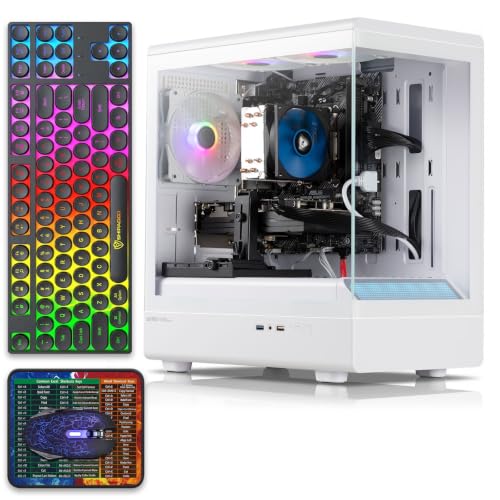
Tisukisu RX 590 Gaming PC
- Dedicated RX 590 8G GDDR5 graphics card
- 16GB of RAM and 512GB SSD included
- Four RGB fans plus RGB case lighting
- Wi-Fi and a wide selection of USB and display ports
- Keyboard, mouse, and mouse pad included
- The title says Core i7, but the feature details specify an Intel Core i5 processor.
- The exact processor generation and model number are not listed.
- Power supply specifications and RAM type are not provided.
What a First Gaming PC Needs
A first gaming desktop should have a real dedicated graphics card rather than relying only on graphics built into the processor. The GPU does most of the heavy visual work, so it has a major effect on image quality and how smoothly demanding games run. A practical starter configuration also includes at least 16GB of RAM and an SSD. That combination gives Windows and games enough working memory while keeping startup, application, and loading times relatively short. Our guide to gaming PC specs explains the main components in more detail.
Convenience matters just as much when this is your first desktop. Look for Windows already installed, plus either Wi-Fi or an Ethernet port for connecting to the internet. Clear display connections are useful because a new owner needs to know where the monitor cable goes. Ideally, setup should involve little more than unpacking the tower, connecting a monitor, keyboard, and mouse, and completing the Windows setup screens. Avoid treating decorative lighting as a substitute for useful hardware. The processor, graphics card, memory, storage, connectivity, and power supply deserve attention first.
Note: A prebuilt tower does not include a monitor, keyboard, or mouse unless the listing specifically says it does. Check the included accessories before ordering.
First PC Checklist
Use this quick checklist to separate gaming-ready desktops from ordinary office computers.
| Component | What to look for |
|---|---|
| Graphics card | A dedicated GPU is essential for gaming. |
| Memory | 16GB RAM is the practical starting point. |
| Storage | An SSD of at least 512GB keeps load times short. |
| Setup | Windows preinstalled and Wi-Fi or Ethernet so it works out of the box. |
The same graphics card can appear in desktops with different processors, memory capacities, storage drives, and power supplies. Compare the complete specification list instead of choosing from the GPU name alone. A balanced system is less likely to have one component unnecessarily limiting another. Our bottleneck overview covers why component pairing matters.
How to Choose Your First Prebuilt
Start with the parts that affect gaming and everyday usability, then compare secondary features such as lighting and case style.
Start With a Dedicated GPU
Integrated graphics are not enough for the gaming experience most buyers expect from a desktop sold for gaming. Make sure the listing names a separate graphics card and provides its model and video memory. These systems use dedicated AMD Radeon or NVIDIA GeForce graphics cards, making them more suitable starting points than general-purpose computers without a discrete GPU. Do not choose from processor branding alone, because a capable CPU cannot replace the graphics hardware responsible for rendering demanding visuals.
GPU tiers also differ considerably. An RTX 5060 Ti is a stronger graphics option than the RTX 5060, RTX 3050, or older RX 590 listed here, while the rest of the configuration still matters. Consider the monitor resolution and visual settings you expect to use, but avoid paying for graphics performance that your display cannot show. The balance between processors and graphics cards is easier to understand through our CPU and GPU comparison.
Keep It Simple to Set Up
A beginner-friendly prebuilt should arrive with Windows already installed and provide clear information about its display, network, and peripheral connections. Wi-Fi is convenient when the computer cannot sit near a router, while Ethernet generally provides a direct wired connection. Check that the desktop has the video output required by your monitor. When a dedicated graphics card is present, the monitor normally connects to the card’s ports on the lower rear section rather than the motherboard connections above them.
Setup instructions and support coverage can also make ownership less intimidating. Among these listings, KOTIN includes Windows 11 Home, a limited warranty, technical support, and a specific reminder about connecting the monitor to the graphics card. ZOTAC, included later as another option, lists Windows 11 Home and separate complete-system and GPU warranty periods. For every machine, read the current listing carefully so you understand the included software, connection options, support terms, and any setup notes before ordering.
Plan for Accessories
A desktop tower is only part of a complete gaming setup. You will ordinarily need a monitor, keyboard, and mouse, while a headset or speakers are necessary if your display does not provide suitable audio. The Tisukisu listing is an exception among these systems because it specifically includes a gaming keyboard, mouse, and mouse pad. Its listing does not state that a monitor is included, so a display should still be treated as a separate purchase.
Check monitor inputs before selecting a cable. Several systems list HDMI and DisplayPort connections, but availability varies by graphics card and model. Older displays may require an adapter, as the KOTIN listing specifically notes for VGA or DVI monitors. Also consider where the tower will sit, whether your router supports a convenient connection, and how many USB devices you intend to attach. Planning these details in advance prevents a working computer from becoming frustrating simply because one accessory or cable is missing.
Choose Room to Grow
A first computer does not need every premium component, but it should leave reasonable options for later changes. Standard cases, accessible storage positions, free memory slots, and suitably rated power supplies can make upgrades easier. The KOTIN listing identifies four DDR4 DIMM slots and two M.2 SSD slots, while the WIWB and Qehi RTX 5060 listings mention additional drive space. These details are more useful for long-term ownership than lighting alone because storage and memory are common beginner upgrades.
Not every prebuilt uses equally interchangeable hardware, so inspect component details and internal photos when available. A proprietary case, motherboard, connector, or power supply can complicate repairs and replacements even when the original machine performs well. Our overview of proprietary PC parts explains what to watch for. Before attempting an upgrade, check the case clearance, available connectors, power capacity, component compatibility, and warranty terms rather than assuming every standard-looking part will fit.
Who Should Buy Which System
- Best overall: Qehi RTX 5060 combines RTX 5060 graphics, 16GB DDR4, a 1TB NVMe SSD, WiFi 6, and Windows-ready setup.
- Best for the strongest GPU: WIWB RTX 5060 TI pairs its RTX 5060 Ti with 16GB DDR4 and 1TB NVMe storage.
- Best value: Tisukisu RX 590 includes RX 590 graphics, 16GB RAM, a 512GB SSD, and bundled input accessories.
- Best alternative brand: KOTIN RTX 5060 TI provides RTX 5060 Ti graphics, a 650W 80 PLUS Gold PSU, and defined expansion slots.
- Best runner-up: Qehi RTX 3050 suits buyers wanting RTX 3050 graphics, 16GB DDR4, WiFi 6, and compact SSD capacity.
Final Thoughts
The Qehi RTX 5060 is the most balanced starting point, combining dedicated graphics, practical memory and storage, Windows-ready convenience, and useful connectivity. It should suit a beginner who wants a straightforward all-around desktop.
Choose the WIWB RTX 5060 TI instead if graphics strength is the priority. Whichever system you select, confirm the included accessories, display connections, warranty terms, and complete component list before ordering.
More Options to Consider
- ZOTAC RTX 5060 combines an RTX 5060 with a compact case, 1TB NVMe SSD, WiFi 6E, Bluetooth 5.2, and a built-in system display. It suits buyers who value clearly stated warranty support from an established graphics brand.
- Olialia RTX 3060 TI offers 32GB RAM, a 1TB SSD, six adjustable RGB fans, and a compact dual-chamber case. It is an alternative for buyers who prefer more included memory and RTX 3060 Ti graphics.
- Olialia Ryzen 7 5700X RTX 3060 TI pairs an AMD Ryzen 7 5700X with an RTX 3060 Ti, 32GB DDR4, and a 1TB PCIe NVMe SSD. It suits gaming, streaming, and heavier multitasking needs.
FAQs
1. What should a first-time PC gamer buy?
A first-time PC gamer should look for a desktop with a clearly named dedicated graphics card, at least 16GB of RAM, and SSD storage. Windows should already be installed, and the system should support either Wi-Fi or Ethernet. Choose a configuration that matches your monitor and the types of games you expect to play. Clear warranty and connection information can also make setup and troubleshooting much easier for a new owner.
2. Is a prebuilt a good first gaming PC?
Yes, a prebuilt can be a practical first gaming PC because the core components arrive together and Windows is often already installed. You do not need to select every individual part or assemble the hardware yourself. The tradeoff is that component quality and upgrade flexibility vary between sellers. Read the complete specification list, confirm the graphics card is dedicated, and check whether the motherboard, case, and power supply support likely upgrades.
3. Do I need to buy a monitor separately?
Usually, yes. A listing for a gaming desktop commonly refers only to the tower, although some packages include a keyboard, mouse, or other accessories. Never assume a monitor is included unless the product description says so directly. Check which video connections the graphics card provides and select a compatible monitor and cable. If you already own a display, verify whether it uses HDMI, DisplayPort, or an older connection that may require an adapter.
4. How much should a starter gaming PC cost?
The right budget depends on the graphics performance, storage capacity, warranty, and upgrade flexibility you need. Entry-level systems cost less but may require lower visual settings or earlier component upgrades, while mid-range models generally provide a more comfortable starting point. Set aside part of the budget for a monitor and input devices if they are not included. Our overview of prebuilt PC costs explains the major factors that affect the total.
5. Can a beginner upgrade a prebuilt gaming PC?
Yes, beginners can often upgrade memory and storage with basic preparation, provided the desktop uses compatible parts and has open slots or drive positions. Graphics card upgrades require more planning because case clearance, power connectors, and power-supply capacity all matter. Check the manufacturer or seller documentation before opening the case. Warranty terms can differ, so confirm whether making a change affects coverage before removing components or altering the original configuration.









