

Lag spikes, endless loading screens, and frame drops can turn a relaxing gaming session into a frustrating fight with aging hardware. For players dealing with a sluggish setup, the best gaming desktops under $300 offer a practical path toward smoother play without requiring a major investment.
Recommended by Us

Dell Core i5 Tower Desktop PC
- 16GB DDR4 RAM is generous for a general-purpose desktop.
- Windows 11 Pro is included.
- 256GB SSD storage is included.
- WiFi, RGB keyboard, and mouse are listed with the system.
- GeForce GT 1030 graphics card is included.
- The Intel Core i5-7500 is a 7th-generation processor.
- 256GB of storage may be limiting for large file libraries.
- This is a renewed desktop rather than a new system.
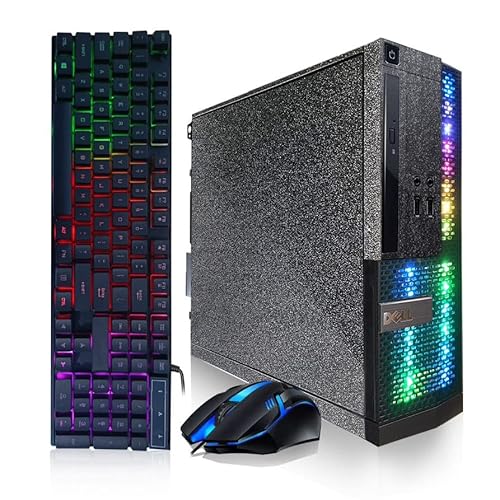
Dell Treasure Box RGB i5 Desktop
- Includes 16G RAM and a 512G SSD
- Comes with RGB keyboard and mouse
- WiFi, Bluetooth, and a DVD drive are listed
- Windows 11 Pro is included
- Compact all-in-one-style accessory bundle for a starter desktop setup
- The listing does not specify the graphics card
- Exact Intel i5 generation and model are not provided
- This is a renewed desktop rather than a new system

OKAMUS i5 Budget Desktop PC
- Low listed price for a pre-built Windows 11 Home desktop.
- Wi-Fi 6 and Bluetooth 5.3 are included.
- 256GB M.2 storage is included.
- Three RGB fans provide a distinctive case appearance.
- Integrated graphics only; no dedicated graphics card is included.
- 8GB RAM and 256GB storage may feel limiting for heavier multitasking or large file libraries.
- The exact i5 processor generation is not specified.
Which Budget Desktop Fits Your Play Style
I would point casual players toward the Dell Treasure Box RGB when they want a roomy 512GB SSD, 16GB of memory, and a four-core Intel Core i5 processor that reaches up to 3.6GHz. It also includes Wi-Fi, Bluetooth, a DVD drive, Windows 11 Pro, and RGB keyboard and mouse accessories. That makes it a practical choice for schoolwork, streaming, older games, and everyday desktop use.
I would go with the Dell Gaming Tower for someone who specifically wants a separate graphics card for casual gaming. Its Core i5-7500, 16GB DDR4 memory, 256GB SSD, and GeForce GT 1030 with 2GB GDDR5 graphics offer a clearer starting point for lighter graphical workloads. Buyers wanting a substantially stronger gaming setup should compare prebuilt gaming PCs under $800 before committing. Dell also provides product and support information on its official site.
FAQs
1. Can a gaming desktop under $300 run modern games?
It depends heavily on the game and its settings. Systems in this class are better suited to casual, older, indie, and less demanding titles, while newer graphically intensive releases can require more capable hardware. Lowering visual settings may help, but it cannot replace a stronger graphics card.
2. Why does a dedicated graphics card matter for gaming?
A dedicated graphics card has its own graphics memory and is designed to handle visual rendering separately from the processor. The Dell Gaming Tower includes a GeForce GT 1030 with 2GB GDDR5 memory, which is a useful feature for entry-level gaming compared with relying solely on integrated graphics.
3. Is 16GB of RAM enough for a budget gaming PC?
For many casual gaming and multitasking needs, 16GB is a sensible amount of memory. It gives the system room for background apps alongside a game, although the processor and graphics hardware still shape gaming capability. Learn more through our guide to RAM and computer memory.
4. Should I choose a larger SSD or a graphics card?
Choose based on the job you expect the PC to do most often. A larger SSD gives you more room for games and files, while a dedicated graphics card is generally more useful for gaming visuals. External storage can expand capacity later, but graphics upgrades may be less straightforward.
5. Are renewed gaming desktops worth considering?
Renewed desktops can be a sensible route when expectations match the hardware tier. Check the listed processor, memory, storage, operating system, included accessories, and support terms carefully. If virtual reality is a priority, look instead at our selection of VR-ready prebuilt gaming PCs.
Editor’s Verdict
Among the Best Gaming Desktops Under $300, I would choose the Dell Gaming Tower for casual players who value its dedicated GeForce GT 1030 graphics. The Dell Treasure Box RGB is the better fit when storage capacity, connectivity, and bundled RGB accessories matter more than dedicated graphics.


