

Core Ultra 9 is Intel’s top current line, so it suits high-end builds with strong graphics cards. Among the best prebuilt gaming PCs with Intel Core Ultra 9, the Skytech RTX 5070 TI pairs Intel Core Ultra 9 U9 285K with NVIDIA GeForce RTX 5070 Ti 16GB GDDR7, and the Skytech Prism is the lower-cost pick.
Recommended by Us

Skytech O11 Vision RTX 5070 Ti Gaming PC
- High-tier RTX 5070 Ti GPU with 16GB GDDR7
- Fast Core Ultra 9 285K processor
- Generous 32GB DDR5 6000 RGB memory
- 360mm AIO liquid CPU cooling
- Distinctive white Lian Li PC-O11 Vision case
- The 1TB SSD may require expansion for a large library of modern applications and games.
- The listing specifies 802.11 AC rather than a newer Wi-Fi standard.
- Graphics card brand and additional display ports may vary.

CLX Horus RTX 5080 Gaming PC
- High-end GeForce RTX 5080 graphics with 16GB of GDDR7 memory
- 24-core Intel Core Ultra 9 285K processor
- Fast 32GB DDR5 memory and spacious 2TB SSD
- 360mm liquid cooling system with a screen
- Includes Wi-Fi, wired networking, RGB lighting, and Windows 11 Home
- The listing does not identify the power supply wattage or efficiency rating.
- Specific motherboard, SSD, and memory speeds are not provided.
- Windows 11 Home may lack some business-focused features available in Windows 11 Pro.

Lenovo Legion Tower 7i Gen 10 RTX 5080
- High-end RTX 5080 graphics with 16GB GDDR7 memory
- Fast Core Ultra 9 processor and generous 64GB DDR5 memory
- Large 2TB SSD for games and creative files
- 360mm liquid cooling with ARGB fans
- Wi-Fi 6E, 2.5GbE, keyboard, mouse, and USB hub included
- Power supply wattage is not specified in the listing
- No monitor is listed as part of the package
- Construction materials and internal expansion options are not detailed
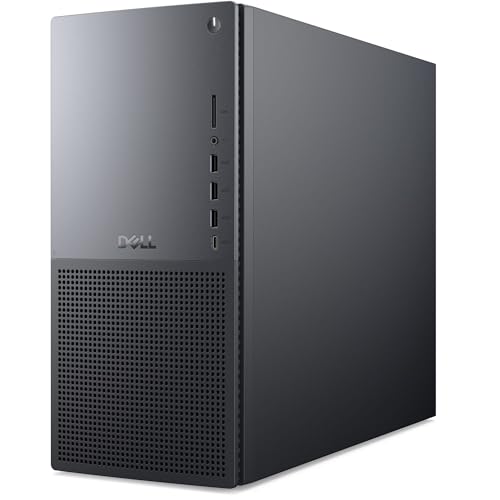
Dell Tower Plus EBT2250 RTX 5060 Desktop
- Strong Core Ultra 9 processor with 24 cores and speeds up to 5.7 GHz
- RTX 5060 GPU uses newer GDDR7 graphics memory
- Generous 32GB DDR5 memory configuration
- Fast SSD and higher-capacity hard drive are both included
- Wi-Fi 7, Bluetooth, keyboard, and mouse are included
- A monitor is not included
- The RTX 5060 has 8GB of VRAM, which may be limiting for especially demanding high-resolution graphics workloads
- The secondary hard drive is slower than an SSD

Skytech Prism 4 Ultra 9 RX 9070 XT
- High-end RX 9070 XT graphics with 16GB of GDDR6 memory
- Fast Core Ultra 9 285K processor and 32GB of DDR5-6000 RAM
- 360mm AIO liquid CPU cooling
- Fast Gen4 NVMe storage
- Keyboard and mouse are included
- The 1TB drive may feel limited for users with large game or media libraries
- The listing specifies 802.11ac rather than a newer Wi-Fi standard
- The graphics card brand and additional display connections may vary
Understanding Core Ultra 9
Intel Core Ultra 9 represents Intel’s current top processor class for desktops, making it appropriate for gaming while streaming, content creation, demanding productivity, and heavy multitasking. Its importance does not mean the processor alone determines gaming performance. The graphics card usually has the larger effect on resolution, visual settings, ray tracing, and overall frame-rate potential. A Core Ultra 9 system therefore makes the most sense when it includes a suitably powerful GPU rather than an entry-level card that leaves much of the processor’s capability unused. For high-resolution gaming, prioritize configurations with upper-tier GeForce RTX or Radeon RX graphics. Memory capacity, storage, cooling, and upgrade options still matter, but the CPU and GPU pairing should come first. Our CPU versus GPU overview explains their different roles.
Note: Intel Core Ultra 9 works best with a graphics card that matches its level, since a weak GPU or CPU on either side holds the other back.
A Sensible Upgrade Order
A well-configured Core Ultra 9 desktop should remain responsive for years, but individual parts may need attention as games, displays, and storage needs change. Upgrade according to the limitation you can identify rather than replacing components simply because a newer generation exists.
- Start with storage capacity. Modern game libraries can fill a smaller SSD quickly, so add compatible internal storage or use a suitable external drive before replacing performance hardware that still meets your needs.
- Increase memory when real workloads consistently approach the system’s available capacity. Most of these systems already include 32GB or 64GB of DDR5, which provides comfortable room for gaming, background applications, streaming, and many creative tasks. Our gaming RAM guide explains when additional capacity helps.
- Upgrade the graphics card when you move to a more demanding monitor, raise visual settings, or find the GPU becoming the consistent gaming limit. Confirm power-supply capacity, case clearance, connectors, and cooling before choosing a replacement.
- Replace the wider platform last. A Core Ultra 9 processor is already positioned at the high end, so changing the motherboard and CPU is usually less urgent than improving storage or graphics unless a future application requires a different platform.
This order protects the value of the original configuration and focuses spending on noticeable limitations. It also avoids replacing a capable processor simply because one game or application needs more graphics power, memory, or storage space.
First-Day Setup Checks
After the desktop arrives, inspect the case, glass panels, external connectors, and power cable before turning it on. Remove any internal shipping material according to the manufacturer’s instructions. Connect the monitor directly to the dedicated graphics card rather than a motherboard video output, then connect networking, keyboard, and mouse. Once Windows starts, confirm that the listed processor, memory capacity, storage drives, and graphics card appear correctly in system information.
Run Windows Update, then obtain current graphics drivers through NVIDIA or AMD as appropriate. Check the PC maker’s support page for relevant system, networking, and motherboard updates. Avoid changing firmware settings immediately unless you understand the purpose and have confirmed the exact motherboard. Create a restore point after the initial update cycle, and check that every advertised storage drive is visible and formatted for use.
Intel Core Ultra 9 is a current-generation top Intel processor line built for demanding workloads, but gaming still depends heavily on the installed graphics card. Match display resolution and settings to the GPU rather than assuming the CPU makes every configuration equally fast. Listen for unusual fan noise, watch temperatures with reputable monitoring software, and run a familiar game long enough to verify stable behavior. Our warranty overview covers what to check before changing internal hardware.
Parts That Matter Most
Use the processor name as a starting point, then examine the rest of the specification before deciding whether a system fits your monitor, games, and upgrade plans.
| Part | Priority | Why |
|---|---|---|
| CPU | High for multitasking | Intel Core Ultra 9 is the target family, but check the exact model in the listing because clock behavior and platform details can differ. |
| GPU | Highest for gaming visuals | Match the card to your monitor resolution, preferred visual settings, and interest in features such as ray tracing or GPU-assisted creative work. |
| RAM | Moderate | 16GB is the practical minimum for a modern gaming system, while 32GB gives useful headroom for background software, streaming, and demanding applications. |
| Platform | High for longevity | The motherboard and memory type set upgrade options, available expansion, connectivity, and compatibility with future replacement parts. |
The GPU should receive particular attention because these systems do not all occupy the same graphics tier. Storage also varies from a single 1TB SSD to larger configurations, while cooling ranges from unspecified approaches to named 360mm liquid-cooling systems. If you are unsure how much hardware your games require, our gaming PC specs article provides a practical baseline. Buyers planning gradual upgrades should also verify whether standard components are used and whether opening the system affects service terms.
How These Systems Differ
The Lenovo Legion and CLX Horus both pair the Intel Core Ultra 9 285K with an NVIDIA GeForce RTX 5080 featuring 16GB GDDR7. The Lenovo has 64GB DDR5 5600MT/s memory, a 2TB SSD, and a 250W 360mm Legion Coldfront liquid-cooling system. The CLX supplies 32GB DDR5, a 2TB SSD, and a 360mm liquid cooler with a screen. Lenovo includes Windows 11 Pro, while CLX lists Windows 11 Home and lifetime technical support.
The Skytech RTX 5070 TI uses the Intel Core Ultra 9 285K with an NVIDIA GeForce RTX 5070 Ti 16GB GDDR7. It includes 32GB DDR5-6000 memory, a 1TB Gen4 NVMe SSD, a Z890 motherboard, and a 360mm AIO liquid cooler. The Skytech Prism keeps the same listed processor, memory capacity, memory speed, storage capacity, Z890 platform, and 360mm AIO format, but substitutes an AMD Radeon RX 9070 XT 16GB GDDR6. Their cases also differ: the O11 Vision uses a white Lian Li PC-O11 Vision, while the Prism 4 uses a black C8 Wood Curve case.
The Dell RTX 5060 takes a more understated route. It combines the Intel Core Ultra 9 285K with an NVIDIA GeForce RTX 5060 8GB GDDR7, 32GB DDR5, a 1TB NVMe SSD, and a separate 2TB hard drive. Dell also lists Windows 11 Pro, Wi-Fi 7, a wired keyboard and mouse, and one year of onsite service. Its graphics card sits below the RTX 5080, RTX 5070 Ti, and Radeon RX 9070 XT options represented here. For this topic, that GPU difference matters most because every system already includes a high-end Intel processor, while graphics capability varies substantially.
Matching Systems to Buyers
Lenovo Legion is the overall choice, combining RTX 5080 graphics, 64GB DDR5, a 2TB SSD, and 360mm liquid cooling.
Skytech RTX 5070 TI suits GPU-focused gaming with RTX 5070 Ti graphics, 32GB DDR5-6000, a Z890 motherboard, and a 360mm AIO.
Skytech Prism is the value choice, pairing Radeon RX 9070 XT graphics with 32GB DDR5-6000 and liquid cooling.
CLX Horus is the alternative-brand option with RTX 5080 graphics, a 2TB SSD, and lifetime technical support.
Dell RTX 5060 is the runner-up for buyers wanting Windows 11 Pro, mixed SSD and hard-drive storage, and Wi-Fi 7.
Other Core Ultra 9 Configurations
- Centaurus RX 9070 XT combines the Intel Ultra 9 285K with Radeon RX 9070 XT 16GB graphics, 64GB DDR5, and a 2TB NVMe SSD. Its 850W 80+ Gold power supply, liquid CPU cooler, and lifetime support suit buyers who value disclosed component details and an AMD graphics configuration.
- CyberpowerPC RX 9060 XT differs by using the non-K Intel Core Ultra 9 285 and Radeon RX 9060 XT 16GB graphics. It includes 32GB DDR5, a 2TB PCIe 4.0 NVMe SSD, liquid CPU cooling, Wi-Fi 6, and free lifetime technical support.
- Dell RTX 4060 emphasizes memory and storage with 64GB DDR5 and a 4TB NVMe SSD, but its NVIDIA GeForce RTX 4060 8GB is a more modest gaming match for the Intel Core Ultra 9 285K. It fits users whose productivity and storage requirements outweigh the need for a higher graphics tier.
The Strongest Overall Choice
The Lenovo Legion is the strongest all-around choice because it pairs the Intel Core Ultra 9 285K with RTX 5080 graphics, 64GB DDR5, substantial SSD storage, and specified liquid cooling. For a less costly-looking balance of components without stepping down to entry-level graphics, the Skytech Prism is the more value-focused alternative with Radeon RX 9070 XT graphics and 32GB DDR5.









