Desk space disappears quickly once an ultrawide monitor stand, mechanical keyboard, and oversized mousepad claim their share of the surface. Traditional stereo speakers often force awkward placements or create tangled cable nests behind displays. That is why upgrading to the best PC speaker bars has become a practical solution for setups needing direct, forward-firing audio without cluttering valuable desktop real estate.
Recommended by Us

- Slim, low-profile form factor frees up valuable desk space under monitors
- Convenient single-touch sensor quickly toggles lighting effects
- Driver-free operation powered directly via standard USB or USB-C
- Fused audio and power cables help reduce tangled desk clutter
- Lacks Bluetooth support for wireless device streaming
- No integrated headphone jack or microphone passthrough
- Exact wattage output and driver sizes are omitted from specifications

- Clever clip-on design frees up valuable desk space around your workstation
- Automatic G-sensor channel switching maintains correct stereo staging in any position
- Includes a USB-C adapter to easily connect with modern laptops and tablets
- Intuitive front touch controls provide immediate volume and mute access
- Not compatible with TVs, projectors, or monitors acting purely as display inputs
- Specific power wattage and driver dimensions are not listed by the manufacturer
- Lacks auxiliary 3.5mm and Bluetooth wireless connection options
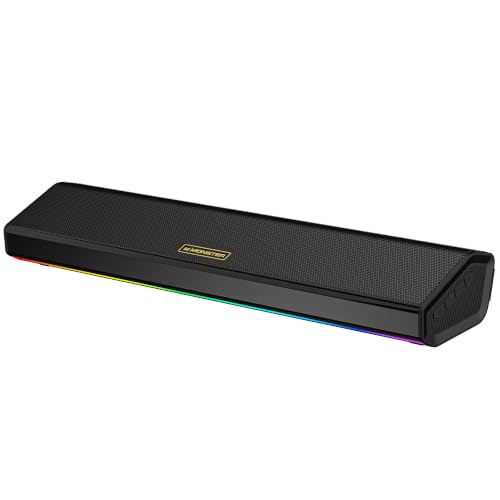
Monster SD100 Desktop Speakers
- Offers both Bluetooth 6.0 and 3.5 mm aux-in connectivity
- 28W stereo design is tailored to desktop and monitor setups
- TWS wireless pairing adds flexibility for a wider speaker arrangement
- Built-in microphone is useful for calls
- Designed to work across PCs, laptops, monitors, and gaming setups
- No separate subwoofer is listed
- Detailed technical specifications are not provided in the available product data
- No HDMI, optical, or USB audio connection is listed
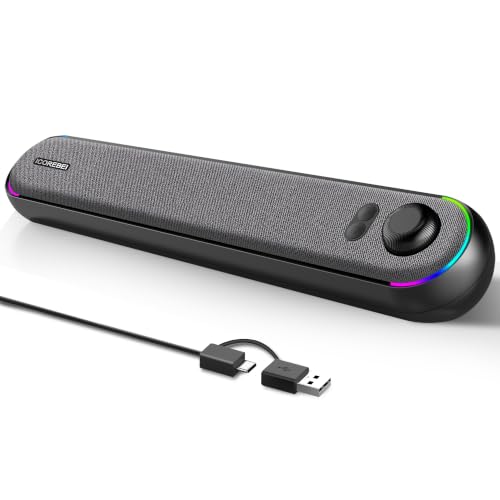
ICOREBEI USB-C Bluetooth PC Soundbar
- Offers both USB-C and Bluetooth 5.3 connectivity
- USB-powered operation can simplify placement at a desk
- Three RGB modes add customizable ambient lighting
- Designed specifically for computer and monitor setups
- Channel configuration and power output are not specified
- No subwoofer information is provided
- HDMI and optical TV connections are not listed

OFFSIR RGB Computer Speakers
- USB-powered operation
- Includes a 3.5mm Aux connection
- Touch-sensitive RGB lighting
- Compatible use cases listed for PC, laptop, desktop, and monitor setups
- No power output is listed
- Channel configuration is not specified
- No subwoofer information is provided

Bluedee Bluetooth Computer Soundbar
- Includes both Bluetooth and AUX connectivity.
- USB and USB-C powered design offers flexible desk setup options.
- Made for PCs, monitors, laptops, and gaming setups.
- Stereo audio is clearly stated in the product title.
- Power output is not specified in the available listing data.
- No subwoofer information is provided.
- The listing does not mention TV-focused connections such as HDMI or optical.

Redragon GS560 RGB Desktop Soundbar
- Dynamic lighting bar includes audio-light sync and display effects
- USB power and a 3.5mm cable offer a simple wired setup
- Dedicated volume knob is convenient for desktop use
- Touch-control backlighting complements the RGB-focused design
- Power output is not specified in the listing
- No subwoofer is specified
- The listed connection is wired rather than wireless
Matching a Soundbar to Your Desktop Needs
If you want serious volume and the flexibility to step away from your workstation, the Monster SD100 Desktop Speaker is the model I would go with. Its dual 14W drivers generate 28W of stereo power, and the integrated 1800mAh battery pairs with Bluetooth 6.0 for wireless listening when you prefer an uncluttered desk layout without power cables.
For buyers who want an affordable, no-nonsense audio upgrade, I would point toward the LENRUE G11 Desktop Speaker. It draws continuous power over USB and receives sound through a standard 3.5mm auxiliary cord, eliminating wireless pairing delays while providing an accessible volume knob right on top. Meanwhile, users struggling with zero available desk depth should look at the XKX Monitor Speaker, which clamps securely to the edge of your display and uses an internal G-sensor to flip stereo channels automatically depending on whether you mount it above or below the panel. Peripheral coverage on PC Gamer often emphasizes how horizontal form factors preserve valuable desk space.
FAQs
1. Can a PC soundbar connect through a single USB cable?
Some models support unified digital audio transmission and DC power through one USB cord, while others require a USB port strictly for power alongside a separate 3.5mm auxiliary cable for sound. Reviewing the connectivity specifications before purchasing ensures your motherboard or monitor passthrough has the right ports available.
2. How does Bluetooth audio compare to wired connections on PC?
Wired audio connections eliminate wireless latency, which remains crucial during competitive gaming and video editing where sound synchronization matters. Bluetooth 5.0 and newer standards provide convenient wireless playback from smartphones or tablets, but minor transmission latency can occasionally desynchronize gaming audio cues or spoken dialogue during video playback.
3. Do compact desktop soundbars provide enough bass without a subwoofer?
Compact soundbars rely on dual passive radiators to produce lower frequencies within a slender enclosure. While these internal radiators cannot match the physical rumble of a dedicated floor subwoofer, they deliver balanced low-end response that keeps dialogue rich and prevents gaming explosions from sounding tinny or hollow.
4. Where is the most effective spot to position a soundbar on a desk?
Placing the soundbar horizontally right under your monitor keeps the stereo field centered with your seating position. Many models feature slightly upward-angled enclosures that fire acoustic energy toward your ears rather than into the desk surface, reducing unwanted reflections and improving dialogue clarity.
5. Do PC soundbars require dedicated software or drivers to work?
Most desktop soundbars operate as plug-and-play peripherals using generic USB audio codecs or standard analog inputs. You typically do not need to install proprietary control software, though selecting the correct default playback device in your operating system audio mixer ensures immediate sound output.
Editor’s Verdict
Selecting the best PC speaker bars comes down to your desktop real estate and connectivity preferences. If you want punchy output and wireless freedom, the Monster SD100 Desktop Speaker delivers energetic sound with Bluetooth capability. For ultra-compact workstations where desk depth is minimal, the XKX Monitor Speaker clamps directly onto your screen bezel to keep surfaces clear.