

Blender rendering scales with the graphics card and its video memory, so the GPU is the part to plan around. Among the best prebuilt gaming PCs for Blender, the Kinupute RTX 5060 TI pairs AMD Ryzen 7 9800X3D with GeForce RTX 5060 Ti 16GB, and the WIWB RTX 5070 is the lower-cost pick.
Recommended by Us
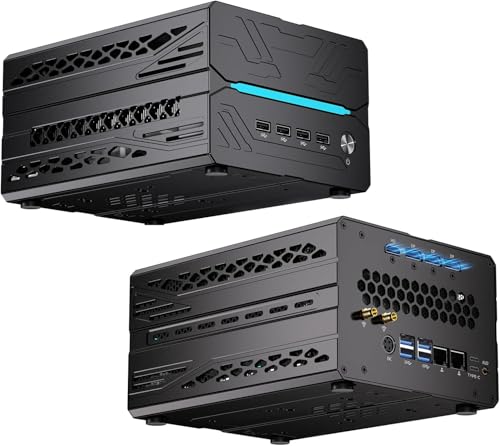
Kinupute Ryzen 7 RTX 5060 Ti Mini PC
- High-end Ryzen 7 9800X3D processor with large 3D V-Cache
- RTX 5060 Ti includes 16GB of GDDR7 video memory
- Generous 64G DDR5 configuration and 8T of combined listed storage
- Supports as many as six displays through HDMI, DisplayPort, and Type-C
- Strong connectivity with dual 2.5GbE, Wi-Fi 7, and Bluetooth 5.4
- Only two of the three available drive positions can be used at the same time because of internal space limitations
- Power supply wattage and efficiency rating are not specified in the listing
- The compact chassis may offer less room for component changes than a conventional desktop tower

HELLOLAND Ocean of Stars RTX 5070 PC
- Strong Ryzen 7 and RTX 5070 configuration for gaming and creative workloads
- 32GB of DDR5 memory is well suited to heavy multitasking
- Dedicated 12GB of GPU memory supports high-resolution creative and AI output
- Includes liquid CPU cooling, wireless connectivity, and Windows 11
- A 1TB SSD may feel limited for large media libraries, modern game collections, or locally stored AI models
- The listing does not identify the motherboard, SSD brand, or exact DDR5 speed
- Specific physical port counts and chassis dimensions are not provided

WIWB Core Ultra 7 RTX 5070 Gaming PC
- High-end RTX 5070 graphics with 12GB GDDR7
- Strong Core Ultra 7 265KF processor for gaming and creative work
- Fast DDR5 memory and NVMe storage
- Supports ray tracing, DLSS, Wi-Fi, and Ethernet
- Airflow-focused chassis design
- 16GB of RAM may be limiting for heavier creative workloads or extensive multitasking
- A 1TB drive can fill quickly with a large collection of modern games and project files
- The listing does not specify the motherboard, power supply, RAM speed, or exact Wi-Fi standard

HELLOLAND Ocean of Stars RTX 5060 PC
- Current-generation RTX 5060 graphics with DLSS 4 support
- Eight-core Ryzen 7 9700X processor and 32GB DDR5 RAM
- Generous 2TB combined SSD capacity
- 240mm liquid cooling with software-controlled RGB lighting
- Wi-Fi, Bluetooth, and Windows 11 are included
- The RTX 5060 is limited to 8GB of VRAM, which may constrain demanding high-resolution workloads.
- The listing does not identify the motherboard model or available external ports.
- Storage uses separate PCIe and SATA SSDs rather than two PCIe drives.

STORMCRAFT Valkyrie RX 9070XT Gaming PC
- High-end CPU and GPU combination for competitive, 1440p, and 4K gaming.
- Generous 32GB DDR5-6000 memory and 2TB NVMe storage configuration.
- 360mm ARGB liquid CPU cooler and 850W 80 Plus Gold power supply are included.
- Adjustable, rotatable GPU anti-sag bracket supports large triple-fan graphics cards.
- Gaming keyboard and mouse are included.
- The operating system is not specified in the listing.
- Wi-Fi and Bluetooth support are not listed.
- The display-stage action figure shown or referenced is not included.
What Blender Needs Most
Blender can stress several components at once, so the right PC needs more than a fast gaming processor. A strong GPU can accelerate supported rendering workloads, while video memory helps the card hold complex geometry, textures, and scene data. CPU core count still matters for CPU rendering, simulation, multitasking, and other creation tasks. Plenty of RAM keeps larger scenes and background applications from exhausting system memory, while a fast SSD makes project loading, caching, and asset management feel more responsive. A gaming PC can handle gaming and Blender well when these parts are balanced instead of concentrating the entire budget on one component. Extra spending usually helps most when it moves you to a faster GPU with more video memory, followed by additional RAM for complex projects and a multicore CPU for CPU-heavy work. Our overview of gaming PC specs explains the broader hardware basics.
Worth knowing: Rendering speed depends heavily on the graphics card and its video memory. A fast GPU can still become limiting if a complex scene exceeds the memory available on the card.
A Sensible Upgrade Order
- Upgrade system RAM first if active projects regularly fill the current capacity. This is often the simplest way to improve stability when working with larger scenes or several applications.
- Replace the graphics card when GPU rendering is the main bottleneck. Check power, case clearance, and cooling before choosing a faster card.
- Add or expand SSD storage when project files, texture libraries, caches, and games compete for space. Keeping active Blender files on fast storage can improve everyday responsiveness.
- Consider a CPU or platform upgrade last unless CPU rendering, simulation, or encoding dominates your workflow. Our CPU and GPU comparison explains how their roles differ.
How These Systems Compare
The WIWB RTX 5070 combines a Core Ultra 7 265KF with a GeForce RTX 5070 12GB GDDR7, but its 16GB of DDR5 RAM and 1TB NVMe SSD 3.0 are the least generous memory and storage configuration among these table choices. It is positioned well for GPU-focused work, although Blender users handling heavier scenes may want to plan a RAM upgrade. The HELLOLAND RTX 5070 pairs the same GPU class and 12GB VRAM capacity with an AMD Ryzen 7 9700X, 32GB DDR5 RAM, a 1TB PCIe SSD, and a 240mm liquid cooler.
The Kinupute RTX 5060 Ti takes a different approach. Its AMD Ryzen 7 9800X3D has eight cores and sixteen threads, while the GeForce RTX 5060 Ti provides 16GB GDDR7. The listed configuration includes 64GB DDR5, a 4TB M.2 PCIe 4.0 SSD, and a 4TB SATA SSD. Its compact chassis uses four copper fans and eight heat pipes rather than an AIO. The HELLOLAND RTX 5060 also uses the eight-core AMD Ryzen 7 9700X, but it has a GeForce RTX 5060 8GB, 32GB DDR5, combined PCIe and SATA storage, and a 240mm liquid cooler.
The STORMCRAFT RX 9070 XT emphasizes gaming performance through an AMD Ryzen 7 7800X3D and AMD Radeon RX 9070XT 16GB GDDR6. It also provides 32GB dual-channel DDR5, a 2TB NVMe SSD, a 360mm liquid cooler, and an 850W 80 Plus Gold power supply. Across these systems, CPU models and cooling affect sustained mixed workloads, while RAM and storage determine how comfortably projects fit. For Blender rendering specifically, the most consequential difference is usually the GPU and its available video memory.
Checks Before You Order
- Does the graphics card provide enough video memory for the complexity and texture sizes of the scenes you expect to create?
- Is the included RAM capacity adequate for Blender, reference material, browser tabs, and other creative applications running together?
- Does the storage capacity leave room for games, source assets, render outputs, simulations, caches, and backups?
- Can the cooling system sustain long rendering sessions without placing the computer in a poorly ventilated location?
- Does the power supply have enough capacity for the included hardware and any graphics upgrade you may consider later?
- Are the warranty terms and upgrade policies clear before purchase? Our prebuilt PC warranty overview identifies details worth checking.
Core Hardware for Blender
Graphics Card and Video Memory
The GPU is often the first component to prioritize when Blender rendering is central to the purchase. A stronger graphics card can reduce rendering time in supported GPU workloads, while more video memory provides additional room for detailed geometry, high-resolution textures, and complex scenes. Gaming also benefits from capable graphics hardware, making the GPU the clearest shared investment. Spending more here usually makes sense before paying for visual case features or excessive storage that will remain unused.
Processor Cores and System Memory
A multicore CPU remains valuable for CPU rendering, simulations, encoding, background work, and general responsiveness. RAM supports the whole workflow by holding scene data and active applications, so capacity can matter more than small differences in memory speed. Systems with 32GB offer a more comfortable creative starting point than 16GB, while larger capacities suit heavier multitasking and more complex assets. Our gaming PC RAM guide provides additional context.
Fast Storage and Balanced Parts
Fast SSD storage does not replace a strong GPU or processor, but it improves project loading, application startup, cache access, and asset transfers. Capacity matters because games, texture libraries, source footage, and completed renders can consume space quickly. A balanced gaming PC pairs its graphics card with enough memory and storage to prevent routine bottlenecks. Additional spending is most useful when it addresses a real constraint, such as limited SSD capacity or insufficient RAM, rather than chasing one impressive specification.
Match a System to You
- Best overall: WIWB RTX 5070 pairs a Core Ultra 7 265KF with GeForce RTX 5070 graphics.
- Best for the strongest GPU option: Kinupute RTX 5060 TI supplies 16GB graphics memory, 64GB DDR5, and extensive storage.
- Best value: HELLOLAND Ocean of Stars RTX 5060 combines Ryzen 7 9700X performance, 32GB DDR5, and dual-drive storage.
- Best alternative brand: HELLOLAND Ocean of Stars includes GeForce RTX 5070 graphics, 32GB DDR5, and liquid cooling.
- Best runner-up: STORMCRAFT RX 9070 XT offers 16GB graphics memory, 32GB DDR5, and a 2TB SSD.
Blender PC Questions Answered
1. Can one prebuilt PC handle Blender and modern games?
Yes. Gaming and Blender both benefit from strong graphics hardware, although Blender also rewards ample RAM, fast storage, and multicore CPU performance. A balanced gaming PC can cover both uses without requiring separate systems. Focus on the parts rather than gaming labels, since memory and storage configurations can vary substantially between otherwise similar machines.
2. Should Blender users prioritize the CPU or GPU?
The answer depends on how you render and which tasks fill most of your working time. GPU-focused rendering places greater emphasis on graphics performance and video memory, while CPU rendering and some simulations benefit from more processor cores. For a mixed gaming and Blender system, a capable GPU paired with a modern multicore processor is usually the most practical balance.
3. Is 16GB of RAM enough for learning Blender?
It can be enough for learning, lighter scenes, and basic projects, but it leaves less room for demanding assets and multitasking. A system with 32GB provides more breathing room for Blender, games, browsers, and supporting applications. Users working with increasingly complex scenes may eventually benefit from 64GB or more, provided the computer supports the upgrade.
4. How much video memory should a Blender GPU have?
There is no single capacity that fits every scene. More video memory helps when projects contain detailed geometry, numerous objects, or high-resolution textures, while smaller projects can run comfortably with less. If Blender is a long-term priority, choosing more video memory can provide useful headroom and reduce the chance that larger scenes exceed the GPU’s available capacity.
5. Does SSD capacity affect Blender rendering speed?
An SSD does not usually replace CPU or GPU performance as the main rendering factor, but it improves the surrounding workflow. Fast storage helps with loading projects, opening applications, transferring assets, and accessing caches. Capacity is equally practical because project versions, textures, simulations, games, and finished output can quickly occupy a smaller drive.
6. Can I upgrade a prebuilt Blender PC later?
Many prebuilt PCs allow upgrades, but compatibility depends on the motherboard, case, power supply, cooling, and use of standard components. Check memory slots, drive connections, graphics card clearance, and power capacity before ordering. Our guide to proprietary PC parts explains why some systems are easier to modify than others.
Higher-End Systems Worth Considering
Skytech King 95 combines an AMD Ryzen 9 9900X3D with AMD Radeon RX 9070 XT 16GB graphics, 32GB DDR5, a 2TB Gen4 NVMe SSD, and a 360mm liquid cooler. It suits buyers who want a high-end AMD graphics configuration for gaming and creation.
Skytech King 95 RTX 5070 TI uses the same listed processor, memory capacity, storage capacity, and cooling size but switches to a GeForce RTX 5070 Ti 16GB GDDR7. It is the more relevant King 95 configuration for shoppers who prefer NVIDIA graphics.
VIPRTECH RTX 5070 TI offers a twelve-core, twenty-four-thread AMD Ryzen 9 7900X, GeForce RTX 5070 Ti 16GB graphics, 32GB DDR5, and a 2TB NVMe SSD. Its distinctive wood paneling suits buyers who want workstation-capable hardware with a less conventional case design.
Choosing Your Blender Desktop
The WIWB RTX 5070 is the strongest overall fit for shoppers prioritizing a capable gaming and Blender GPU, though its memory and storage deserve consideration. Choose the Kinupute RTX 5060 TI instead when generous RAM, extensive storage, and 16GB of graphics memory better match the size of your projects.









