

Picking an RTX 5090 system comes down to what else is in the box: the CPU, the memory and the cooling. Among the best RTX 5090 prebuilt gaming PCs, the CLX Horus pairs AMD Ryzen 9 9950X3D with GeForce RTX 5090, and the CLX RTX 5090 is the lower-cost pick.
Recommended by Us
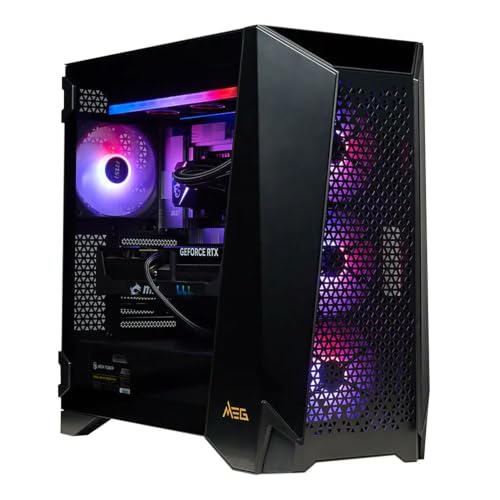
MSI Infinite ZS RTX 5090 Gaming PC
- Top-tier RTX 5090 GPU with 32GB of GDDR7 VRAM
- High-end 16-core Ryzen 9 processor with 3D V-Cache
- Fast 2TB PCIe Gen5 SSD
- 360mm liquid AIO cooling
- Wi-Fi 7 and 2.5GbE networking
- 32GB of system RAM may be modest for some especially memory-intensive professional workflows.
- The listing does not specify the power supply wattage or efficiency rating.
- At 52 pounds and 22.3 inches deep, the tower requires substantial desk or floor space.

CLX Set RTX 5090 Gaming PC
- Flagship-tier GeForce RTX 5090 graphics
- High-end Intel Core Ultra 9 285K processor
- Generous 64GB DDR5 memory capacity
- Combination of fast NVMe storage and spacious HDD storage
- Includes a 360mm liquid cooler and Wi-Fi
- A premium configuration that may be excessive for casual gaming or everyday tasks
- The 4TB HDD is better for bulk capacity than SSD-level access speeds
- Power supply specifications and detailed port selection are not listed

CLX Horus RTX 5090 Gaming PC
- Flagship GeForce RTX 5090 graphics
- High-end AMD Ryzen 9 9950X3D processor
- Large 96GB DDR5 memory capacity
- Combination of 2TB NVMe storage and an 8TB hard drive
- Includes 360mm AIO cooling, Wi-Fi and Windows 11 Home
- The motherboard model and power supply specifications are not listed.
- The 8TB secondary drive is an HDD rather than all-SSD storage.
- The large 18.8 x 9.4 x 20.8-inch chassis requires substantial desk or floor space.
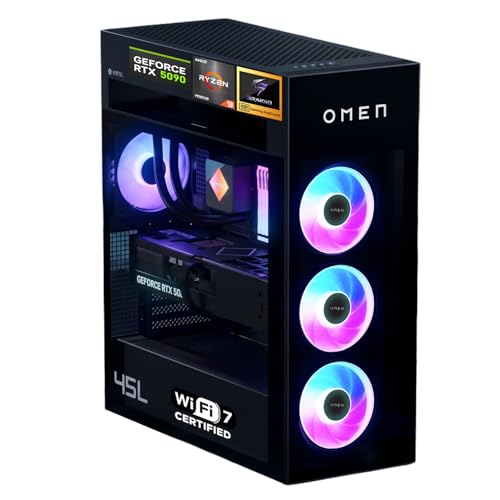
HP Omen MAX 45L RTX 5090 Gaming Desktop
- Top-tier RTX 5090 graphics for demanding gaming and creative workloads
- High-end Ryzen 9 9900X3D processor with AMD 3D V-Cache
- Exceptional 96GB DDR5 memory and 4TB SSD configuration
- Separated CPU cooling system with a second-generation Cryo Chamber
- Modern Wi-Fi 7, Bluetooth 5.4, and extensive wired connectivity
- Exceptionally expensive compared with mainstream gaming desktops
- At 49.82 pounds, the tower may be difficult to move regularly
- Its 21.85 by 18.5 by 8.03-inch chassis requires substantial desk or floor space
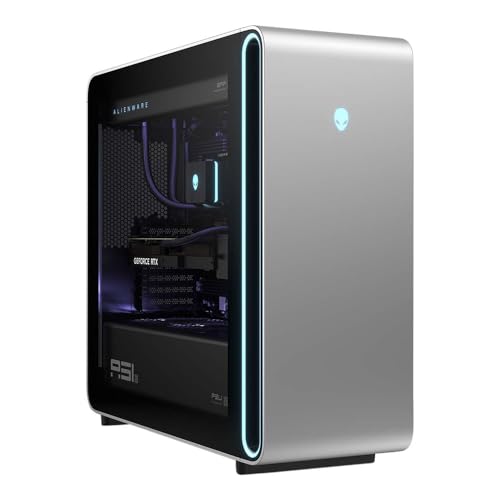
Dell Alienware Area-51 RTX 5090 Desktop
- Top-tier RTX 5090 graphics with 32GB GDDR7
- High-end Core Ultra 9 processor and 64GB of fast DDR5 memory
- Large 4TB solid-state drive
- Strong wired and wireless connectivity options
- Large 24.04 x 9.12 x 22.4-inch footprint requires considerable desk or floor space
- Power supply wattage is not specified in the listing
- Internal expansion options and port layout are not detailed
Myths About RTX 5090 Worth Ignoring
Shopping by the GPU name alone can hide meaningful differences between complete desktop configurations.
Every Similar Listing Includes the Same GPU
A product title may use similar language across several configurations, so confirm that the specific desktop includes the NVIDIA GeForce RTX 5090 and check its stated video memory. The systems in our main comparison specify an RTX 5090 with 32GB GDDR7. Read the current configuration carefully before ordering because storage, memory, processor, and graphics options can differ between versions of an otherwise similar desktop.
Worth knowing: Check the RTX 5090 version and stated memory in the current listing before buying, since graphics cards with similar names can be offered with more than one memory size.
Any Modern CPU Is Fast Enough
A flagship graphics card can still be held back by an underpowered processor, especially at lower resolutions, high refresh rates, or in CPU-heavy workloads. The table systems avoid that mismatch with processors such as the AMD Ryzen 9 9950X3D, AMD Ryzen 9 9900X3D, and Intel Core Ultra 9 285K. Our CPU and GPU guide explains how both components affect gaming performance.
Cooling and Power Are Secondary Details
The processor and graphics card may headline a specification sheet, but cooling and power delivery matter when demanding components run for long periods. Look for a capable liquid cooler, a suitable power supply, and a case designed to move heat effectively. Listed configurations include features such as 360mm liquid coolers, a separated CPU cooling chamber, and high-capacity power supplies, though the exact arrangement differs from one desktop to another.
The Graphics Card Determines the Entire Value
Two desktops with the same RTX 5090 can offer very different overall packages. Compare the CPU, DDR5 capacity, SSD size, secondary storage, networking, cooling, support, and included peripherals rather than treating the GPU as the only meaningful component. A configuration with less memory may be sufficient for gaming, while a creator or heavy multitasker could benefit from more RAM and storage. The right value depends on which features you will actually use.
How the Parts Fit Together
The NVIDIA GeForce RTX 5090 is a top-end current-generation graphics card aimed primarily at high-detail 4K gaming, demanding ray tracing, high-refresh displays, and substantial creative workloads. It sits above less expensive cards that can still perform well at 1440p or 4K with more selective settings. There is no higher gaming model identified among the systems on this page, so moving beyond this class generally means considering specialized professional hardware rather than a conventional gaming upgrade. Our gaming PC specs overview provides wider component context.
At this performance level, the surrounding parts determine whether the GPU can work without obvious constraints. A high-end AMD Ryzen 9 or Intel Core Ultra 9 processor is a sensible match, while DDR5 memory supports modern platforms and demanding multitasking. For gaming alone, 32GB is already a substantial starting point; 64GB, 96GB, or 128GB can better suit heavy creation and concurrent workloads. Fast NVMe storage keeps the system responsive, while sufficient cooling and power support sustained operation. Our gaming PC memory article explores RAM capacity in more detail.
Quick Picks by Situation
- Best overall: CLX Horus pairs 96GB DDR5 with extensive SSD and HDD storage.
- Best for the strongest GPU setup: msi RTX 5090 combines the RTX 5090 with an AMD Ryzen 9 9950X3D and Gen5 SSD.
- Best value: CLX RTX 5090 provides 64GB DDR5 and both solid-state and hard-drive storage.
- Best alternative brand: HP Omen Max 45L features an AMD Ryzen 9 9900X3D and separated CPU cooling system.
- Best runner-up: Dell Area-51 includes 64GB DDR5-6400, a 4TB SSD, and Wi-Fi 7.
Final Thoughts
The CLX Horus is the best overall option for buyers wanting a powerful gaming CPU, generous memory, and extensive storage around the RTX 5090. Its configuration is particularly well suited to gaming, creation, and large local libraries.
The msi RTX 5090 is the better fit if you prefer a focused 32GB gaming configuration with an AMD Ryzen 9 9950X3D, Gen5 SSD, 360mm liquid cooler, and modern networking.
More Options to Consider
- APC Helios combines 128GB DDR5 and a 4TB NVMe SSD with a 360mm liquid cooler and 1200W power supply. It suits demanding multitaskers and creators who want especially high memory capacity.
- MAINGEAR RTX 5090 uses a compact mATX design with hidden reverse-connector cabling, 32GB DDR5-6000, and a 2TB Gen4 NVMe SSD. It is a good alternative for buyers who value a cleaner, smaller design and standardized hardware.
- Skytech RTX 5090 pairs an AMD Ryzen 9 9950X3D with 64GB DDR5, a 4TB Gen4 NVMe SSD, and a large 420mm liquid cooler. It suits buyers seeking substantial cooling and storage without moving to unusually high memory capacity.
FAQs
1. Is the RTX 5090 good for gaming?
Yes. The NVIDIA GeForce RTX 5090 is a flagship gaming GPU intended for demanding graphics settings, high-resolution displays, ray tracing, and high-refresh play. Its capabilities also make it useful for streaming, rendering, AI-assisted applications, and other GPU-heavy creative work. It is more performance than many gamers need, particularly when gaming at lower resolutions or with a standard-refresh monitor.
2. What CPU pairs well with a RTX 5090?
A high-end current-generation processor is the most appropriate companion for an RTX 5090. These systems use chips such as the AMD Ryzen 9 9950X3D, AMD Ryzen 9 9900X3D, and Intel Core Ultra 9 285K. These processors are designed for demanding gaming and multitasking, reducing the risk that a weak CPU will limit an otherwise premium graphics configuration.
3. How much RAM does a RTX 5090 gaming PC need?
For a dedicated gaming system, 32GB of DDR5 is a strong starting point and should leave room for background applications. Configurations with 64GB can make sense for streaming, heavy multitasking, and creative software, while 96GB or 128GB is mainly attractive for demanding professional workloads. Capacity is only part of the decision, so also confirm the memory generation and listed speed.
4. What resolution is the RTX 5090 best for?
The RTX 5090 is primarily aimed at 4K gaming with demanding visual settings, including ray tracing where supported. It can also serve high-refresh displays or graphics-intensive creative applications. Using it at 1440p is reasonable for buyers prioritizing very high refresh rates, but less expensive graphics cards may provide a better-balanced system for conventional 1440p gaming.
5. Is a prebuilt RTX 5090 PC worth buying?
It can be worthwhile if you want flagship graphics without selecting, sourcing, and integrating every component yourself. Evaluate the entire configuration, including the processor, memory, storage, liquid cooler, power supply, networking, warranty, and support. Our prebuilt PC bottleneck article explains why component balance matters even in an expensive system.
6. Is it better to build or buy at this level?
Building offers greater control over the motherboard, case, cooling, power supply, storage, and appearance. Buying a prebuilt is more convenient and provides one complete system with support from its manufacturer or system integrator. At the RTX 5090 level, compare component transparency, upgrade access, warranty coverage, and your comfort with assembly before deciding. Neither route is automatically better for every buyer.









