

Listings under the Skytech name vary a lot in price and hardware, so compare them on the parts, not the badge. Among the best Skytech prebuilt gaming PCs, the Skytech King 95 pairs AMD Ryzen 7 9850X3D with NVIDIA GeForce RTX 5070 Ti 16GB, and the Skytech RTX 5060 TI is the lower-cost pick.
Recommended by Us

Skytech Rampage RTX 5070 Ti Gaming PC
- High-end RTX 5070 Ti graphics with 16GB GDDR7 VRAM
- Strong Ryzen 7 9700X processor and 32GB DDR5 memory configuration
- Fast Gen4 NVMe storage
- Large 360mm AIO liquid CPU cooler
- Keyboard and mouse are included
- The graphics card brand may vary between systems
- Only one HDMI and one DisplayPort connection are explicitly promised, with additional outputs varying
- Wi-Fi is limited to the listed 802.11 AC standard rather than a newer Wi-Fi generation

Skytech King 95 RTX 5070 Ti Gaming PC
- High-end RTX 5070 Ti graphics with 16GB GDDR7
- Gaming-focused Ryzen 7 9850X3D processor
- Generous 32GB DDR5 memory and 2TB NVMe storage
- 360mm AIO liquid cooling with ARGB fans
- Wi-Fi 6 and keyboard-and-mouse bundle included
- The graphics card brand may vary between units
- Only one HDMI and one DisplayPort connection are explicitly promised, while additional outputs may vary
- The listing does not identify the motherboard or power supply model
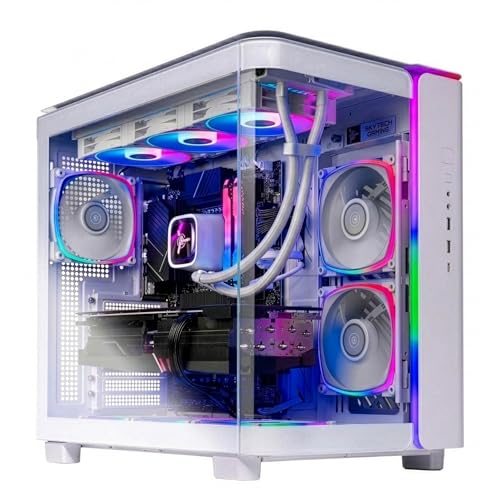
Skytech King 95 RTX 5070 Ti Gaming PC
- High-end RTX 5070 Ti graphics with 16GB GDDR7
- Fast Ryzen 7 7700X processor and 32GB DDR5 6000 RAM
- Large 2TB Gen4 NVMe M.2 SSD
- 360mm AIO liquid cooling with ARGB fans
- The graphics card brand may vary between units
- 802.11ac Wi-Fi is listed rather than a newer Wi-Fi standard
- At roughly 47.1 pounds, the tower may be cumbersome to move

Skytech Gaming Ryzen 5 RTX 5060 Ti PC
- RTX 5060 Ti graphics target high-detail 1080p gameplay.
- Useful 1TB NVMe SSD capacity.
- 16GB of DDR4-3200 memory is included.
- Air cooler and ARGB fans are listed for enhanced airflow.
- Keyboard, mouse, Wi-Fi 5, and Bluetooth are included.
- The 8GB graphics memory may be less accommodating for demanding settings beyond the listed 1080p target.
- DDR4 memory and Wi-Fi 5 are older standards than DDR5 and newer wireless options.
- Graphics card brand and additional display ports may vary.

Skytech Aurora Pink RTX 5060 Ti Gaming PC
- RTX 5060 Ti 8GB graphics are positioned for smooth 1080p gaming.
- Fast 1TB NVMe M.2 storage is included.
- Distinctive Aurora Pink case with front mesh and ARGB fans.
- Includes Wi-Fi, Bluetooth, keyboard, and mouse.
- Uses DDR4-3200 memory rather than newer DDR5.
- Wi-Fi 5 is included instead of a newer Wi-Fi standard.
- The graphics card brand and additional display ports may vary.
Understanding Skytech Gaming Desktops
Skytech prebuilt gaming PCs cover several performance and design categories. Names such as Skytech Shadow, Azure, and King identify product families, but the name alone does not establish the hardware inside. The graphics card, processor, memory, storage, cooling, and connectivity shown on the exact listing are what matter most.
Models vary substantially in hardware and price positioning. A value-oriented system may combine an older processor platform with a capable mainstream GPU, while a performance model can add DDR5 memory, liquid cooling, and a higher-tier graphics card. Our overview of gaming PC specs explains how these components affect everyday use.
Warranty and technical support also deserve attention before checkout. These systems list a one-year parts-and-labor warranty and free technical support, but buyers should still read the terms attached to the exact product page. Confirm what is covered, how service requests work, and whether upgrades could affect coverage.
Questions Before Comparing Models
Why should I compare the GPU first?
The graphics card has the largest direct influence on gaming performance across these systems. Compare the exact GPU name and video-memory capacity, especially when choosing between machines intended for 1080p, 1440p, or 4K gaming.
Can two similarly named Skytech PCs perform differently?
Yes. A shared case or family name does not mean two listings contain the same processor, graphics card, memory, or storage. Read every specification rather than treating the model name as a complete configuration.
Heads up: The same Skytech model name can appear with different processors and graphics cards, so compare the full specification before buying.
Could custom parts make future upgrades harder?
Some branded systems use proprietary cases, motherboards, power connections, or other components that can restrict replacement choices. The supplied listings do not identify those details, so verify component formats with the seller when upgrade flexibility matters.
What should I check in the warranty terms?
Confirm the coverage period, included components, service procedure, shipping responsibilities, and any restrictions related to modifications. Our warranty overview covers the common language worth checking before you order.
How do I compare value between two models?
Look beyond the brand and case design. Compare the GPU, processor generation, memory capacity, memory type, storage capacity, cooling hardware, wireless standard, and included support to understand what the added cost provides.
Does a more expensive model always suit gaming better?
Not automatically. Higher-end hardware may be unnecessary for a lower-resolution monitor or lighter games. A balanced configuration can offer better practical value when its graphics card, processor, and memory already meet your actual requirements.
Hardware Priorities at a Glance
Use these priorities to separate meaningful hardware differences from cosmetic changes.
| Part | Priority | Why |
|---|---|---|
| GPU | Highest for gaming | Compare the exact graphics card across models because it drives most of the difference in gaming capability. |
| CPU | High | Processor generations differ between listings and can affect gaming, streaming, and productivity performance. |
| RAM and storage | Medium | Capacity varies by model, affecting multitasking room and how many large games fit locally. |
| Support | Essential to verify | Read the warranty and technical-support terms attached to the exact listing. |
A gaming build should be considered as a complete system rather than a single headline component. The GPU usually leads the decision, but the processor must be suitable for the workload and the memory should cover current needs. Our CPU and GPU comparison explains where each component matters.
Common Skytech Listing Terms
- Gen4 NVMe M.2 SSD: A compact solid-state storage format that uses a PCIe interface; listings here vary between standard NVMe wording and Gen4 specifications.
- GDDR7 graphics memory: Dedicated memory located on the graphics card, with capacity varying between the listed RTX 5060 Ti, RTX 5070 Ti, and RTX 5080 configurations.
- AIO liquid CPU cooler: A closed-loop processor cooler included with several higher-performance systems, while the listed Ryzen 5 desktops use air cooling.
- Brand may vary: The system includes the stated GPU class, but the manufacturer of the installed graphics card may differ between units.
Component format matters if you expect to replace parts later. Our explanation of proprietary PC parts outlines why standard connections and dimensions can make long-term upgrades easier.
Choosing a Performance Tier
| Tier | What You Get | Best For |
|---|---|---|
| Value tier | A mainstream GPU, practical memory capacity, NVMe storage, and air cooling | 1080p gaming and buyers prioritizing core performance |
| Balanced tier | A stronger processor platform, DDR5 memory, and a higher-capacity graphics configuration | 1440p gaming, multitasking, and broader performance needs |
| Performance tier | A high-tier GPU, more memory, larger storage, and liquid CPU cooling | Demanding high-resolution gaming and heavier mixed workloads |
Choose the lowest tier that comfortably meets your monitor, games, and non-gaming workloads. Spending more makes sense when the stronger GPU or added storage will be used. Our breakdown of prebuilt PC costs provides broader context for comparing system tiers.
Matching Systems to Buyers
Best overall: Skytech King 95 RTX 5070 TI combines an NVIDIA Geforce RTX 5070 Ti, 32GB DDR5 RAM, and 2TB storage.
Best for the strongest GPU: Skytech Rampage pairs its GPU with a Ryzen 7 9700X and 32GB DDR5 RAM.
Best value: Skytech RTX 5060 TI offers an RTX 5060 Ti 8GB, 16GB DDR4 RAM, and 1TB SSD.
Best alternative configuration: Skytech King 95 adds Wi-Fi 6, 32GB DDR5 RAM, and 2TB storage.
Best runner-up: Skytech Ryzen 5 5500 RTX 5060 TI uses matching core hardware in a pink Aurora mesh-front case.
Other Skytech Configurations Worth Considering
- Skytech RTX 5060 TI X47 combines a Ryzen 5 8400F, RTX 5060 Ti 8GB, and 24GB DDR5 RAM. It suits buyers who want a newer memory platform and a triple-tempered-glass black case.
- Skytech Shadow 5 has a Ryzen 7 9700X, RTX 5060 Ti 16GB, and a 360mm AIO liquid cooler. It is a useful alternative for processor-heavy workloads or buyers wanting more graphics memory than the 8GB configurations provide.
- Skytech King 95 RTX 5080 pairs a Ryzen 7 7800X3D with an RTX 5080 16GB, 32GB DDR5 RAM, and 2TB storage. It is aimed at buyers prioritizing the highest GPU tier listed here and 4K gaming capability.
Skytech Buyer Questions Answered
1. Are Skytech gaming PCs worth considering?
Skytech offers configurations spanning mainstream 1080p systems through substantially stronger 1440p and 4K-oriented desktops. The appeal depends on how the exact CPU, GPU, memory, storage, and cooling compare with competing systems. Do not judge the entire brand from one listing because configurations sharing a family name may contain very different hardware.
2. Which Skytech PC offers the best balance?
The King 95 configuration with the Ryzen 7 7700X and NVIDIA Geforce RTX 5070 Ti is the most balanced selection in the main table. Its 32GB DDR5 memory and 2TB Gen4 NVMe M.2 SSD also provide more capacity than the entry configurations. Buyers focused mainly on 1080p can reasonably choose an RTX 5060 Ti system instead.
3. Is an RTX 5060 Ti Skytech enough for gaming?
An RTX 5060 Ti configuration is positioned well for detailed 1080p gaming, though results depend on the game and settings. Pay attention to whether the listing includes the 8GB or 16GB version. The processor platform also differs, with the listed Ryzen 5 5500 desktops using DDR4 and other configurations using DDR5.
4. Can I upgrade a Skytech desktop later?
Many desktop components are replaceable in principle, but compatibility depends on the motherboard, case clearance, power supply, connectors, firmware, and warranty terms. Those details are not fully provided in these listings. Our prebuilt upgrade guide explains the checks to make before replacing memory, storage, graphics, or cooling components.
5. Do Skytech PCs use proprietary components?
The supplied product information does not identify whether every internal component follows standard retail dimensions and connections. Some prebuilt manufacturers use custom parts, so buyers concerned about upgrades should ask the seller about the motherboard, power supply, case connectors, and cooler mounting. Avoid assuming compatibility solely because a desktop uses familiar AMD or NVIDIA hardware.
6. What should I inspect when the PC arrives?
Check that the delivered processor, graphics card class, memory capacity, storage capacity, case, and wireless features match the order. Remove any internal shipping material according to the setup instructions, then inspect visible cables and components before powering on. Keep the packaging and order information in case support or warranty service becomes necessary.
The Best Skytech Choice
The Skytech King 95 RTX 5070 TI is the strongest overall fit for buyers seeking balanced gaming hardware, generous memory, and substantial storage. Its RTX 5070 Ti configuration is suited to demanding 1440p play without moving to the highest tier.
Choose the Skytech Rampage instead if you prefer its Ryzen 7 9700X, mesh-front case, and 1TB storage configuration. Both deserve a careful listing comparison before checkout.









