

Small form factor builds pack a full gaming GPU into a tiny case, which makes cooling and card length the key limits. Among the best small form factor gaming prebuilt gaming PCs, the Panorama RTX 5060 TI pairs AMD Ryzen 5 5500 with GeForce RTX 5060 TI 8GB, and the Panorama is the lower-cost pick.
Recommended by Us

HOENGAGER Panorama Pink RTX 5060 Ti PC
- RTX 5060 Ti supports ray tracing and DLSS 4.
- Generous 2TB combined SSD capacity.
- Seven RGB fans offer software-controlled lighting.
- 240mm AIO cooling is included.
- Windows 11 and a mouse are part of the package.
- The 8GB graphics memory may require adjusted settings in more demanding 1440p workloads.
- Ryzen 5 5500 and DDR4 use the older AM4 platform.
- Power supply wattage and motherboard model are not specified.
HOENGAGER Panorama RTX 5060 Ti Gaming PC
- RTX 5060 Ti 8GB targets strong 1080p and basic 1440p gaming.
- Generous 3TB combined SSD storage.
- Panoramic tempered-glass design with seven customizable ARGB fans.
- Preinstalled Windows 11 and included mouse simplify initial setup.
- The 8GB graphics memory may be limiting for more demanding 1440p settings.
- DDR4 memory and the AM4 processor platform are from an older generation.
- Power supply details and wireless connectivity are not specified in the listing.

Cooler Master NR2 Pro RTX 5080 Mini ITX PC
- High-end RTX 5080 graphics with 16GB of video memory
- Powerful 20-core Intel Ultra 7 265KF processor
- Generous 32GB DDR5 memory and 2TB Gen4 SSD
- Compact 18.25L Mini ITX design
- Strong connectivity selection including Wi-Fi, Bluetooth, and USB-C
- The 28-pound weight is substantial for a compact desktop
- Compact Mini ITX dimensions may provide less internal working room than a full-size tower
- The Intel Ultra 7 265KF does not include integrated graphics, so display output depends on the dedicated GPU
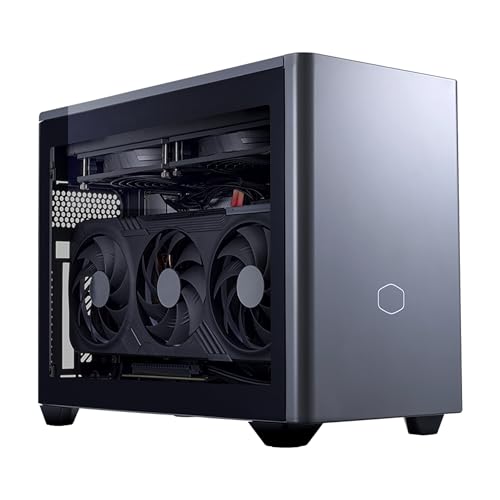
Cooler Master NR2 Pro RX 9070 XT PC
- High-end RX 9070 XT 16GB graphics for demanding 1440p gaming
- Gaming-focused Ryzen 7 7800X3D processor
- Generous 32GB DDR5 memory and 2TB Gen4 SSD
- Compact 18.25L Mini ITX format
- Strong selection of wireless and wired connectivity
- At 28 pounds, it is relatively heavy despite the compact chassis
- Only one HDMI output is listed, although two DisplayPort connections are included
- The operating system is not specified in the product data

TOPGRO T1-MAX RTX 4070 Mini Gaming PC
- High-end RTX 4070 graphics with 8GB GDDR6
- 24-core Intel Core i9 processor with up to 5.4GHz turbo frequency
- Generous 32GB DDR5 memory and fast 1TB PCIe 4.0 storage
- One-touch full-speed fan control for demanding workloads
- Dual 4K display support plus Wi-Fi 6E and 2.5G Ethernet
- The listing does not state the graphics card power limit, which can affect performance in a mini PC.
- HDMI connectivity is limited to HDMI 2.0 rather than a newer HDMI standard.
- Power supply wattage and chassis material are not specified.
What Matters Most for small form factor
A small form factor prebuilt uses a very compact Mini-ITX or similarly space-efficient case while retaining a dedicated gaming GPU. Case volume is a useful comparison because product photos rarely communicate scale accurately. Also check the physical dimensions, ventilation layout, GPU length limits, and access to memory or storage slots. These details determine where the computer fits and how practical future upgrades will be. Our guide to gaming PC specs explains how the main components affect everyday gaming performance.
Note: Small form factor cases commonly run hotter than larger towers. Check the included cooling and ventilation, and expect the fans to become more noticeable during demanding workloads.
Case styling does not make a computer faster. Tempered glass, colored panels, and RGB lighting affect appearance, but the GPU and CPU remain the main performance drivers. Cooling can indirectly matter because components may reduce clock speeds if temperatures become excessive. Look for appropriately sized CPU cooling, clear intake and exhaust paths, and enough room around the case for airflow. Cable routing matters too. Neatly managed cables improve service access and reduce the chance of wires obstructing compact fans, vents, or other tightly packed components.
Quick Answers
Does an expensive-looking case improve gaming performance?
No. Styling, glass, color, and lighting do not determine frame rates or responsiveness. Compare the GPU and CPU first, followed by memory capacity and storage. Our CPU and GPU comparison explains which component usually matters more for different workloads.
How can I judge airflow from a product listing?
Check for visible intake vents, exhaust locations, fan details, and the stated CPU cooler. Glass panels and restricted front sections can retain more heat. A compact case also needs open space around its external vents rather than being pressed against a wall or cabinet.
Why do lighting controls and cable management matter?
Lighting control lets you match the computer to the rest of your setup or turn the effects off. Tidy internal cables create a cleaner appearance, make maintenance easier, and reduce clutter around fans in a case where space is already limited.
Should I pay extra for distinctive styling?
Only if the appearance matters to you after the hardware requirements are covered. Unusual colors, panoramic glass, and extensive lighting can carry a modest premium over plainer systems. Compare the underlying components and support terms before paying primarily for visual design.
Things That Do Not Matter as Much
- Elaborate RGB patterns do not improve gaming speed, so prioritize hardware, cooling, and useful control options before decorative effects.
- A large-looking product photo says little about actual size. Published dimensions and case volume provide a more dependable comparison.
- Extra glass does not guarantee quality. It changes visibility and appearance, while airflow depends on vents, fans, and panel design.
- Brand matching between the PC and peripherals is optional. Standard displays, keyboards, mice, and headsets generally work across brands.
Pick by Priority
- Best overall: CoolerMaster NR2 Pro pairs an Intel Ultra 7 265KF with an RTX 5080 16GB.
- Best for the strongest GPU priority: Panorama provides an RTX 5060 Ti 8GB and liquid cooling in a pink panoramic case.
- Best value: Panorama RTX 5060 TI combines an RTX 5060 Ti 8GB with an NVMe SSD and additional SATA storage.
- Best alternative brand choice: CoolerMaster NR2 Pro RX 9070 XT features an RX 9070 XT 16GB and Ryzen 7 7800X3D.
- Best runner-up: TOPGRO RTX 4070 supplies an RTX4070 8GB, DDR5 memory, and compact connectivity options.
Final Thoughts
The right compact prebuilt balances graphics performance with manageable temperatures, sensible ventilation, and a case that fits your desk. Lighting and glass can make the system more attractive, but they should remain secondary to its core components.
The CoolerMaster NR2 Pro is the premium overall choice. The Panorama RTX 5060 TI is a practical alternative for buyers who want customizable lighting, substantial storage, and a less expensive configuration.
More Options to Consider
- CoolerMaster NR2 Pro RTX 5060 TI uses the same compact 18.25-liter case format as the premium configuration but pairs an Intel Ultra 7 265F with an RTX 5060 Ti 16GB. It suits buyers who want DDR5 memory, a 280mm AIO, and an 850W Gold power supply without moving to the RTX 5080 model.
- AVGPC RTX 5060 TI is an 18-liter Mini-ITX system with a Ryzen 7 5700X, RTX 5060 Ti 8GB, heat-pipe cooler, and 650W Gold SFX power supply. It is worth considering if compact dimensions and straightforward air cooling take priority.
- CoolerMaster NR2 Pro RTX 5070 TI combines a Ryzen 7 9800X3D with an RTX 5070 Ti 16GB. Its 280mm AIO, DDR5 memory, and dual panel options suit buyers seeking a powerful AMD CPU and Nvidia GPU combination.
FAQs
1. Are small form factor gaming PCs slower than others?
Not automatically. A compact PC can use powerful desktop components, and its GPU and CPU determine most of its gaming capability. The main concern is thermal management because a smaller enclosure has less internal space and may have more restricted airflow. A well-cooled compact system can provide strong performance, while inadequate cooling can cause higher temperatures, increased fan noise, or reduced sustained clock speeds.
2. Do small form factor prebuilt gaming PCs cost more?
They sometimes cost more than similarly equipped conventional towers. Compact cases, Mini-ITX motherboards, shorter graphics cards, liquid coolers, and SFX power supplies may carry premiums because they must fit within tighter physical limits. Pricing still varies significantly between configurations. Compare the GPU, CPU, memory, storage, cooling, warranty, and included connectivity rather than assuming every compact system offers equal value.
3. How do I keep a small form factor gaming PC cool?
Keep every intake and exhaust vent clear, and avoid enclosing the computer inside a tight cabinet. Dust filters and fans should be cleaned periodically because buildup restricts airflow. You can also monitor CPU and GPU temperatures with suitable software and adjust fan settings if the manufacturer provides controls. Do not place objects directly against ventilated panels, especially while running demanding software for long periods.
4. Can I change the look of a prebuilt later?
Some visual changes are straightforward, such as adjusting supported RGB lighting, turning lighting off, or changing peripherals. Replacing panels, fans, or the entire case depends on component compatibility and the builder’s design. Compact systems have strict clearance requirements, so verify motherboard size, cooler height, GPU dimensions, and power supply format before purchasing replacement parts. Opening the system may also affect support terms, so check the warranty first.
5. What should I check before buying a small form factor prebuilt?
Start with the GPU and CPU, then confirm memory capacity, storage, cooling, case dimensions, wireless connectivity, display outputs, and available USB ports. Check whether the power supply has enough capacity for the installed hardware and realistic upgrades. Read the warranty details and verify how easy it is to reach memory and storage slots. Our prebuilt bottleneck article explains why balanced component selection matters.
6. Is it better to build or buy at this level?
A prebuilt is usually easier because the seller handles component selection, assembly, operating system setup, and initial driver preparation. Building provides more control over the exact case, cooler, motherboard, cable routing, and fan arrangement, but compact builds require careful clearance checks. The better route depends on your experience, available time, and willingness to troubleshoot. A prebuilt is attractive when convenience and a single support contact matter most.









