


The CyberPowerPC RTX 5070 is the odd one out here, pairing a 12-core Ryzen 9 9900X with an RTX 5070 while most rivals chase the 9800X3D. Among the best prebuilt gaming PCs under $2500, the Skytech RTX 5070 TI is the stronger graphics pick.
Recommended by Us

STORMCRAFT Ultra 7 RTX 5070 Ti Gaming PC
- High-end RTX 5070 Ti graphics
- 32GB of fast DDR5 6000MHz RAM
- 360mm ARGB liquid CPU cooling
- 850W 80 Plus Gold ATX 3.0 power supply
- Wi-Fi 6, Bluetooth and included keyboard and mouse
- The 1TB SSD may feel limited for a large collection of modern games and creative files.
- No operating system is specified in the supplied product data.
- The action figure shown for the display area is not included.

Skytech Gaming Ryzen 7 9800X3D RTX 5070 Ti
- High-end Ryzen 7 9800X3D and RTX 5070 Ti configuration
- Generous 32GB DDR5-5600 memory capacity
- Fast Gen4 NVMe M.2 storage
- Large 360mm AIO liquid CPU cooler
- Keyboard and mouse are included
- The 1TB SSD may require expansion for a large game or media collection
- Only 802.11ac Wi-Fi is listed rather than a newer Wi-Fi standard
- The power supply model and wattage are not specified

STORMCRAFT Valkyrie RTX 5070 Gaming PC
- High-end Ryzen 7 9800X3D processor with 3D V-Cache
- RTX 5070 graphics support ray tracing, VR and AI workloads
- Fast 32GB DDR5 6000MHz dual-channel memory
- 360mm ARGB liquid cooler and 850W Gold-rated modular power supply
- Modern connectivity includes Wi-Fi 6, Bluetooth and USB-C
- A 1TB SSD may fill quickly with a large game and media library
- The display-stage action figure shown or referenced is not included
- The operating system is not specified in the provided product data
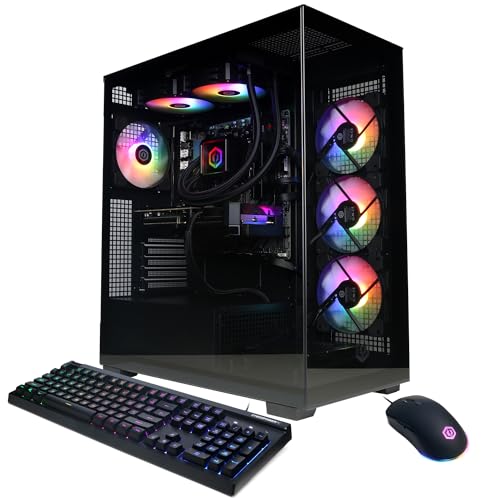
CyberPowerPC Ryzen 9 RTX 5070 Gaming PC
- Strong Ryzen 9 9900X and RTX 5070 hardware configuration
- Generous 32GB DDR5 memory
- Fast PCIe 4.0 NVMe storage
- Liquid CPU cooling and customizable RGB lighting
- Extensive wired and wireless connectivity
- The 1TB SSD may feel limited for users keeping many large applications or games installed.
- Power supply wattage and model are not specified in the listing.
- The included keyboard and mouse are listed without detailed specifications.
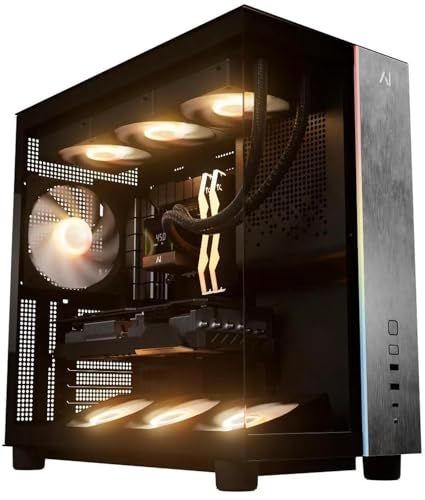
Andromeda Galaxy V3 RX 9070 XT Gaming PC
- High-tier RX 9070 XT graphics card with 16GB of video memory
- Gaming-focused Ryzen 7 9800X3D processor
- Fast 32GB DDR5-6000 memory configuration
- Spacious 2TB Gen 4 NVMe SSD
- Built-in Wi-Fi and Bluetooth
- The listing does not specify the exact case, fan count, or CPU cooling hardware
- Available front and rear ports are not detailed
- Brands and models for the SSD, RAM, and power supply are not identified
What a Gaming PC Around $2500 Can Do
A gaming desktop in this bracket can include mainstream dedicated graphics such as the RTX 5070 Ti, RTX 5070, or RX 9070 XT. These GPUs are primarily suited to high-quality 1440p gaming, including demanding visual settings when the rest of the system is balanced. They can also make 4K gaming practical, although settings may need adjustment in especially demanding software. Modern multi-core processors provide enough performance for gaming, everyday multitasking, streaming, and content creation without making the system feel narrowly focused.
You should also expect enough memory and solid-state storage for current games, although capacity varies considerably between listings. These systems include 32GB of DDR5 memory, while storage ranges from 1TB to 2TB. This remains a performance-focused tier rather than a no-compromise workstation category. The most expensive flagship GPUs, unusually large storage arrays, and specialized professional components generally sit beyond it. Our guide to gaming PC specs explains how the main components affect everyday use.
Worth knowing: A stronger graphics card only pays off when your monitor resolution and refresh rate can use the extra performance. Choose the GPU for the screen you own or plan to purchase.
What to Expect at This Price
Most systems in this category combine current-generation components with gaming-focused supporting hardware.
| Component | What You Get |
|---|---|
| CPU | A modern multi-core processor such as the AMD Ryzen 7 9800X3D, AMD Ryzen 9 9900X, or Intel Core Ultra 7 270K Plus. |
| GPU | Dedicated graphics commonly drawn from the RTX 5070 Ti, RTX 5070, or RX 9070 XT performance classes. |
| RAM | These listings provide 32GB of DDR5 memory, with speeds and stated expansion support varying by system. |
| Storage | A PCIe or NVMe solid-state drive, generally with 1TB or 2TB of listed capacity. |
The same GPU can appear beside different CPUs, memory speeds, storage capacities, coolers, and power supplies. Compare the complete specification rather than assuming two desktops with matching graphics cards are equivalent. A faster processor may help CPU-heavy work, while more storage can be more useful to someone with a large library. Our CPU and GPU comparison explains where each component matters most.
How to Choose a Prebuilt at This Budget
Start with your monitor and primary workload, then examine every supporting component listed by the manufacturer.
Start With the Graphics Card
The graphics card should usually receive the most attention in a gaming-focused desktop. An RTX 5070 is a sensible match for strong 1440p gaming, while an RTX 5070 Ti or RX 9070 XT gives you more graphics headroom. The RTX models also support NVIDIA’s graphics and creator ecosystem, whereas the Radeon option offers 16GB of listed graphics memory in the systems shown here. Pick according to the games, applications, and features you actually intend to use.
Your display sets a practical limit on what you can see. A high-refresh 1440p monitor can make good use of a powerful GPU, while a basic lower-resolution display may not show the full benefit. At 4K, the stronger graphics choices become easier to justify, but visual settings may still require adjustment. Do not sacrifice storage, memory, cooling, or warranty coverage simply to move up one GPU tier unless graphics performance is clearly your first priority.
Balance the CPU and RAM
Avoid configurations built around one impressive part and noticeably weaker supporting hardware. The AMD Ryzen 7 9800X3D is presented in several systems here, while the CyberPowerPC uses an AMD Ryzen 9 9900X and the STORMCRAFT RTX 5070 Ti configuration uses an Intel Core Ultra 7 270K Plus. Each is a modern multi-core option, but the best choice depends on whether gaming, creation, streaming, or general multitasking matters most to you.
For memory, 16GB should be treated as the practical floor for a new gaming computer, while 32GB provides more breathing room for background applications, creation tools, and demanding workloads. Every table model listed here includes 32GB of DDR5 memory. Memory speed can differ, however, and listings do not always provide equal detail about expansion. Check capacity, generation, speed, and available upgrade information rather than focusing on capacity alone. Our gaming PC memory guide provides more context.
Storage, Power and Cooling
An NVMe SSD keeps startup, loading, and file access responsive, but capacity determines how quickly you may need another drive. A 1TB SSD is workable for an initial collection, while the 2TB drives in the Andromeda Insights and Skytech RX 9070 XT systems offer more space. Look for an explicit drive type and interface in the listing. Storage is commonly one of the easier upgrades, but available connectors and drive bays still depend on the individual build.
Power and cooling affect stability, noise, and long-term ownership. Several STORMCRAFT listings specify an 850W 80 Plus Gold ATX 3.0 power supply and a 360mm AIO liquid cooler. Andromeda Insights lists an 850W Gold PSU, while Skytech lists a 360mm AIO for its table configuration. Do not assume an unspecified unit matches these details. Check the stated PSU rating, cooler type, case airflow, and warranty, especially when comparing systems with the same processor or graphics card.
Condition and Upgrades
Confirm the listed condition before ordering, particularly when shopping across marketplaces that may mix new, renewed, open-box, and third-party offers. Also review the seller, included accessories, return window, and warranty terms shown at checkout. Coverage varies among these manufacturers. STORMCRAFT states a longer labor warranty than several alternatives, while Andromeda Insights lists separate parts, labor, and service coverage. The exact terms matter more than a broad promise of support, so read the current policy carefully.
Upgrade potential depends on the case, motherboard, power supply, and internal layout. Check whether the case leaves physical clearance for longer graphics cards, additional drives, and cooling hardware. Standardized parts can simplify later changes, but the listing should support any claim about compatibility. Our guide to prebuilt PC upgrades covers the main checks. Photographs can help with layout, but documented specifications should guide the final decision.
Who Should Buy Which System
- Best overall: STORMCRAFT Valkyrie RTX 5070 pairs its gaming-focused CPU and RTX 5070 with 32GB DDR5.
- Best for the strongest GPU: STORMCRAFT Ultra 7 RTX 5070 TI includes RTX 5070 Ti graphics and a 360mm AIO.
- Best value: CyberpowerPC RTX 5070 combines a 12-core processor, RTX 5070, and 32GB DDR5.
- Best alternative brand: Skytech RTX 5070 TI offers RTX 5070 Ti graphics and a 360mm AIO.
- Best runner-up: Andromeda Galaxy V3 includes an RX 9070 XT, 2TB SSD, and 850W Gold PSU.
Final Thoughts
The STORMCRAFT Valkyrie RTX 5070 is the balanced choice, combining a gaming-focused processor, 32GB DDR5, and clearly stated power and cooling hardware. It suits buyers who want strong 1440p performance without paying only for the highest GPU tier.
Choose the STORMCRAFT Ultra 7 RTX 5070 TI instead when graphics performance, ray tracing, high-resolution gaming, or GPU-assisted creative work matters more.
More Options to Consider
- Skytech RX 9070 XT combines an RX 9070 XT with a 2TB SSD and white showcase case. It suits buyers wanting Radeon graphics and more included storage.
- STORMCRAFT Valkyrie RTX 5070 TI upgrades the Valkyrie combination to RTX 5070 Ti graphics. Its 850W Gold PSU and 360mm AIO suit sustained gaming and creative workloads.
- Lenovo RTX 5070 TI pairs RTX 5070 Ti graphics with an AMD Ryzen 7 9800X3D. Consider it if you prefer Lenovo over a specialist system builder.
FAQs
1. Can you get a good gaming PC for under $2500?
Yes. This budget can cover an RTX 5070, RTX 5070 Ti, or RX 9070 XT alongside a modern processor and 32GB of DDR5 memory. That combination is well suited to high-quality 1440p gaming and can make 4K practical with sensible settings. Compare storage, cooling, power supply details, connectivity, and warranty coverage because those supporting specifications vary even when two computers use similar graphics hardware.
2. Is a prebuilt gaming PC around $2500 worth it?
It can be worthwhile if you want a complete computer, an operating system, and manufacturer support without selecting and assembling every component yourself. The value depends on the entire parts list rather than the processor and graphics card alone. Check the SSD capacity, power supply, cooling system, wireless connectivity, return policy, and warranty. A prebuilt also makes sense when convenience and a single point of support matter more than choosing every individual part.
3. Which graphics card is best around $2500?
There is no universal winner, but the RTX 5070 Ti is the strongest graphics tier represented among the table systems. The RX 9070 XT is another high-performance option and is listed with 16GB of graphics memory in these configurations. The RTX 5070 can leave more room in the overall configuration for CPU power or other features. Match the card to your monitor, preferred graphics technologies, creation applications, and the supporting components included with the desktop.
4. How much RAM does a gaming PC at this budget need?
Sixteen gigabytes is a reasonable minimum, but 32GB is the more comfortable target at this level. It gives games and background software more room while also helping with streaming, content creation, and heavier multitasking. All of the systems in the comparison table list 32GB of DDR5 memory. Capacity is not the only detail, so compare memory generation, stated speed, channel configuration, and whether the manufacturer documents expansion support.
5. Can I upgrade a prebuilt gaming PC later?
Many prebuilts can be upgraded, but compatibility depends on the case, motherboard, power supply, cooling arrangement, and any proprietary connections. Before buying, check physical GPU clearance, available storage connectors, memory limits, and PSU capacity. Warranty terms may also affect whether you should perform an upgrade yourself. Our proprietary PC parts guide explains why some systems are easier to modify than others.









