

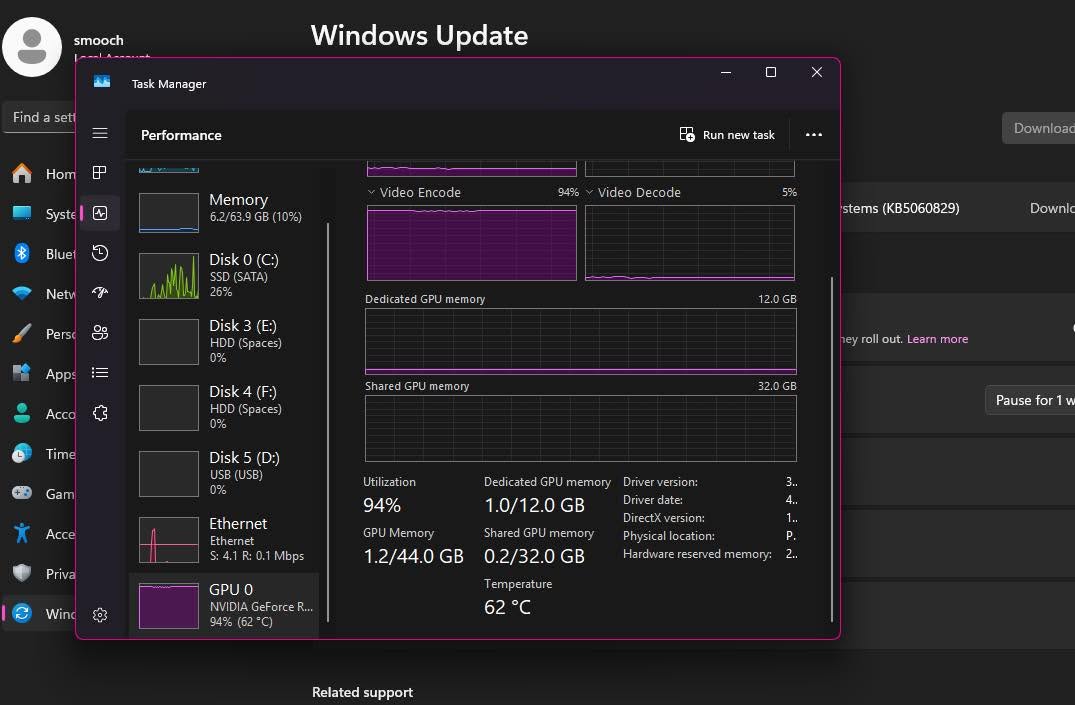
Not by itself. 100% GPU usage means your card is fully used with nothing holding it back, which is what you want for rendering and exports. In games it usually just means the game is demanding, though chasing 100% without a frame cap can add input latency. The trouble is 100% plus stutter or crashes.
- 100% usage means no bottleneck, which is a good sign in most workloads.
- For rendering and exports, 100% usage means the job finishes faster.
- For gaming, constantly maxing out usage can increase input latency.
- 100% usage plus stutter usually points to drivers, not the GPU.
When 100% GPU Usage Is a Good Thing
If you’re rendering video, exporting a 3D project, or running any workload where the goal is raw throughput, 100% GPU usage is exactly what you want. It means the card isn’t sitting idle waiting on something else, and the job finishes as fast as your hardware allows.
The same logic mostly applies to gaming. Seeing your GPU at 100% while playing a demanding game typically means nothing else in your system, like the CPU, is holding it back. That’s a sign your GPU is the limiting factor in a good way: it’s working as hard as it can to push frames, which is a different situation from a card held back by the CPU (see CPU vs GPU for gaming).
When Chasing 100% Usage Actually Hurts
Gaming is where this gets more nuanced than rendering. Constantly running at 100% GPU usage, especially without a frame rate cap, can introduce noticeable input latency. The GPU ends up rendering frames slightly further ahead of what you’re seeing, which adds a small but real delay between your input and what shows up on screen.
Quick fix: capping your frame rate a few FPS below your monitor’s max refresh rate, using in-game settings or a tool like Nvidia’s GeForce Experience, often feels smoother than letting the GPU run flat out at 100%.
Is 100% Usage Bad for Your Hardware?
Running at 100% does mean more heat, more power draw, and louder fans, since the card is working as hard as it physically can. That’s normal operation, not damage. Modern GPUs are built to run at full load for extended periods, whether that’s hours of gaming or an overnight render job, the same way Intel’s own GPU documentation describes them as designed for sustained parallel workloads.
The real concern isn’t the usage number itself, it’s whether your cooling is keeping temperatures in a safe range while it’s happening. A GPU sitting at 100% usage and 65°C is in a completely different situation than one at 100% usage and 90°C, and knowing where that line actually sits matters more than the usage percentage itself.
What If GPU Is at 100% But Performance Is Bad?
If you’re seeing 100% usage alongside stuttering, low frame rates, or crashes, the GPU itself usually isn’t the problem, communication between the game and an outdated or corrupted driver is a much more common culprit. Updating drivers through AMD or Nvidia’s official channels, rather than relying purely on Windows Update, fixes this more often than people expect. Our guide covers how to update GPU drivers step by step.
Task Manager’s Performance tab or MSI Afterburner can help confirm whether usage is actually GPU-bound or something else entirely. Background processes are worth ruling out too. Browser hardware acceleration, a second monitor, or an old benchmark tool left running in the background can all eat into GPU capacity without you realizing it, making your GPU look maxed out when the actual game isn’t the reason. If you’re not even sure which card you’re looking at in Task Manager, start with how to check what GPU you have.
Related reading: a GPU bottleneck.
On the CPU side: CPU usage at 100%.
Frequently Asked Questions
Is it normal for GPU usage to be 100% while gaming?
Yes, especially in demanding games. It usually means your GPU is the limiting factor rather than your CPU, which is generally how you want a gaming PC balanced.
Should I be worried if my GPU is always at 100%?
Not on its own. Worry if it’s paired with high temperatures, stuttering, or crashes, those point to a cooling or driver issue rather than the usage number itself.
Does capping FPS reduce GPU usage?
Yes. Capping your frame rate slightly below your monitor’s refresh rate keeps the GPU from running flat out, which can reduce input latency and heat without a noticeable drop in visual smoothness.
Is 100% GPU usage bad for video editing or rendering?
No, it’s the goal. For rendering and export tasks, full GPU utilization means the job completes in the shortest possible time.


