The best RAM upgrade for gaming depends on your motherboard, processor, and whether you are improving a desktop or laptop. Capacity matters, but memory generation, frequency, latency, and channel configuration also affect the decision. Before ordering, confirm whether your motherboard is compatible with DDR4 or DDR5 RAM.
Recommended by Us

V-Color Manta XFinity RGB 32GB DDR5
- Fast 6000MHz DDR5 specification with relatively low CL30 latency
- Supports both Intel XMP 3.0 and AMD EXPO profiles
- Uses SK Hynix memory ICs
- Includes enhanced heat spreaders and RGB lighting
- Two 16GB modules provide a balanced 32GB kit
- Rated settings require a compatible motherboard and processor memory controller
- RGB lighting and tall heat spreaders may not suit compact or non-RGB builds
- The listing does not specify RGB control software compatibility

V-Color Manta XFinity RGB 32GB
- Fast 6000MHz DDR5 specification with low CL30 latency
- Supports both Intel XMP 3.0 and AMD EXPO
- Uses SK Hynix memory ICs
- Distinctive white heat spreaders with RGB lighting
- Two-module kit supports a dual-channel memory configuration on compatible platforms
- Voltage information is inconsistent, with 1.35V in the title and 1.25V in the feature specifications
- RGB lighting and relatively tall heat spreaders may not suit minimalist or clearance-restricted builds
- Reaching the advertised profile depends on motherboard and processor memory support
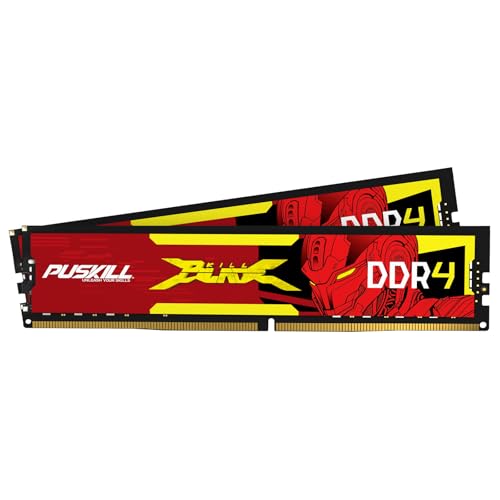
PUSKILL 16GB DDR4-3200 Desktop RAM Kit
- Useful 16GB capacity for mainstream gaming and general desktop use
- Two matched-capacity modules enable dual-channel installation
- Relatively tight CL16 latency at the listed 3200MHz speed
- Convenient Intel XMP 2.0 profile
- Integrated aluminum heat spreaders
- The rated profile may require enabling XMP in the motherboard BIOS
- Compatibility still depends on the motherboard and processor supporting DDR4 UDIMMs
- No RGB lighting is listed for users seeking an illuminated build

OWC 32GB DDR4-2666 SODIMM Kit
- Useful 32GB capacity supplied as two matching 16GB modules
- Specific Mac model IDs and configurations are provided for compatibility checking
- Standard 2666MHz DDR4 specification
- Also listed for compatible systems from several major PC manufacturers
- CAS latency is not provided in the product data
- The title says 288-pin while the feature list says 260-pin SODIMM, so the physical format should be verified
- Compatibility wording for PCs is broad and does not identify individual computer models

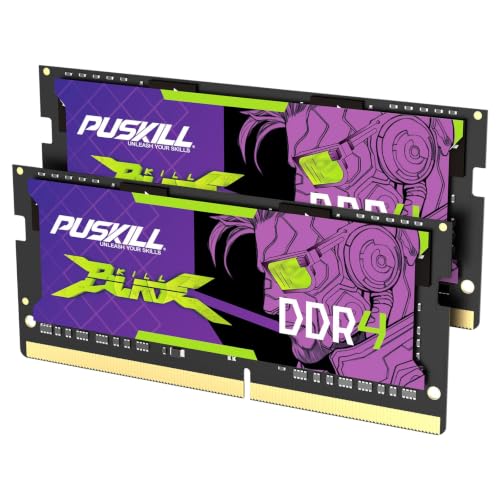
PUSKILL 16GB DDR4-3200 SODIMM
- Useful 16GB capacity in one module
- Leaves room for a future 32GB dual-channel configuration
- Rated for 3200MHz operation
- Designed for straightforward laptop installation
- A single module may run in single-channel mode until a matching second stick is installed
- CL22 prioritizes standard compatibility rather than especially low latency
- Laptop support for DDR4 SODIMM and 3200MHz operation should be confirmed before purchase

Crucial Pro 64GB DDR4-3200 Kit
- Large 64GB capacity for intensive multitasking
- Flexible 3200MHz, 3000MHz, and 2666MHz operation
- Broad listed support for Intel Core and AMD Ryzen platforms
- Intel XMP 2.0 support
- Two-module kit leaves additional memory slots open on four-slot motherboards
- CAS latency is not provided in the listing
- Non-ECC memory is not intended for systems that require ECC support
- Achieving the intended speed depends on processor and motherboard support, and some configurations may require XMP

Timetec 16GB DDR3L-1600 Desktop RAM Kit
- Includes two matched-capacity 8GB desktop modules
- Supports both DDR3L and DDR3 voltage levels
- Clearly specified CL11 latency and 2Rx8 dual-rank layout
- Compatible with supported Intel and AMD desktop platforms
- Standard 240-pin unbuffered UDIMM format
- Not compatible with laptop memory slots
- PCB color may be black or green depending on the production batch
- Non-ECC design is unsuitable for systems that specifically require ECC memory
Choosing the Right Kit for Your Gaming PC
For a current DDR5 gaming build, I would go with the V-Color Manta XFinity. Its 32GB dual-module configuration, 6000MHz rating, and CL30 latency make it the strongest gaming-focused combination in the table. Support for both Intel XMP 3.0 and AMD EXPO also makes the rated profile accessible across compatible Intel and AMD platforms. The black version suits darker builds, while the equivalent white model is available for light-themed systems.
If you are upgrading a DDR4 desktop, the PUSKILL DDR4 3200 is the option I would point to for a straightforward 16GB dual-channel setup. It pairs a 3200MHz rating with CL16 timings and an Intel XMP 2.0 profile. Heavy multitaskers should instead consider the Crucial Pro 64GB, which provides two 32GB DDR4 modules and can operate at 3200MHz, 3000MHz, or 2666MHz. Our overview of which computer RAM is best provides more context on matching memory to a system. Crucial also publishes memory information and compatibility resources on its website.
FAQs
1. Should I choose DDR4 or DDR5 for gaming?
Choose the memory generation supported by your motherboard and processor because DDR4 and DDR5 are not interchangeable. DDR5 makes sense for a compatible new build, while DDR4 remains appropriate when upgrading an existing DDR4 system. Check the motherboard manual and CPU memory specifications before buying.
2. Is 16GB or 32GB better for a gaming PC?
A 16GB kit can suit a focused gaming system, while 32GB provides more room for demanding games, voice chat, browsers, and background applications. The right capacity depends on the titles and programs you run together. For heavier creative work or extensive multitasking, 64GB may be useful, though it is not necessary for every gaming PC.
3. Why are dual-channel RAM kits useful?
A matched two-module kit can use a compatible motherboard’s dual-channel memory configuration, increasing available memory bandwidth compared with a single module. Install the modules in the slots specified by the motherboard manual. If the PC cannot initialize its memory, it generally will not complete startup, as explained in our article about whether a motherboard can boot without RAM.
4. Do I need XMP or EXPO support?
XMP and EXPO profiles help compatible systems apply a kit’s advertised frequency and timings without entering every setting manually. XMP is commonly associated with Intel platforms, while EXPO targets AMD platforms. Confirm support in the motherboard specifications, update the firmware when appropriate, and remember that default memory settings may be lower than the advertised profile.
5. Is lower latency more important than higher memory speed?
Neither specification should be considered alone. At the same frequency, lower CAS latency generally reduces memory access delay, but a higher frequency can provide more bandwidth. Compare kits within the same DDR generation and prioritize a balanced specification that your motherboard and processor can support reliably.
Editor’s Verdict
For the best RAM upgrade for gaming in a compatible DDR5 system, I would choose the V-Color Manta XFinity for its 32GB dual-module layout, 6000MHz rating, and CL30 latency. For an established DDR4 desktop, the PUSKILL DDR4 3200 offers a practical 16GB dual-channel configuration with CL16 timings.