Large timelines, high-resolution footage, and background applications can quickly consume available memory. Choosing the best RAM for video editing means balancing capacity, memory generation, speed, and system compatibility. Before upgrading, it also helps to understand which computer RAM is best for your hardware and workload.
Recommended by Us

OWC 64GB DDR4-2666 SODIMM Kit
- Large 64GB capacity in only two modules
- Explicit support listed for select 2018 Mac mini and 2019 to 2020 27-inch iMac models
- Uses standard DDR4-2666 PC4-21300 specifications
- Compatible part numbers are provided for easier cross-checking
- CAS latency is not provided in the listing
- The title says 288-pin while the feature details specify 260-pin SODIMM
- Compatibility should be confirmed by exact model identifier before purchase

Timetec 16GB DDR3L-1600 Desktop RAM Kit
- Includes two matched-capacity 8GB desktop modules
- Supports both DDR3L and DDR3 voltage levels
- Clearly specified CL11 latency and 2Rx8 dual-rank layout
- Compatible with supported Intel and AMD desktop platforms
- Standard 240-pin unbuffered UDIMM format
- Not compatible with laptop memory slots
- PCB color may be black or green depending on the production batch
- Non-ECC design is unsuitable for systems that specifically require ECC memory

OWC 32GB DDR4-2400 SODIMM Kit
- Useful 32GB capacity for memory-intensive multitasking
- Two-module configuration provides a complete 2x16GB upgrade
- Broad range of listed computer and NAS applications
- Clear compatibility information for specific 2017 iMac model identifiers
- CAS latency is not provided in the listing
- Non-ECC memory is unsuitable for systems that require ECC modules
- Compatibility still needs to be checked against the exact computer or NAS model

Crucial 16GB DDR4-3200 Laptop RAM
- Useful 16GB capacity for laptop multitasking
- Supports up to 3200MHz operation
- Beginner-friendly installation guidance
- Compatibility tools are available before purchase
- Non-ECC 260-pin SODIMM format suits many DDR4 laptops
- CL22 timing is not aimed at buyers seeking especially low latency
- Works only with systems that support DDR4 260-pin SODIMM memory
- RGB lighting is not listed

Colorful DDR4 32GB Desktop Memory Kit
- Generous 32GB dual-module capacity
- Convenient XMP 2.0 profile support
- Low-profile aluminum heat spreaders
- Suitable for gaming, editing, and multitasking
- Standard desktop DDR4 UDIMM format
- XMP must be enabled in BIOS to reach the rated profile
- CL18 may not appeal to buyers seeking tighter timings at the same speed
- RGB lighting is not listed
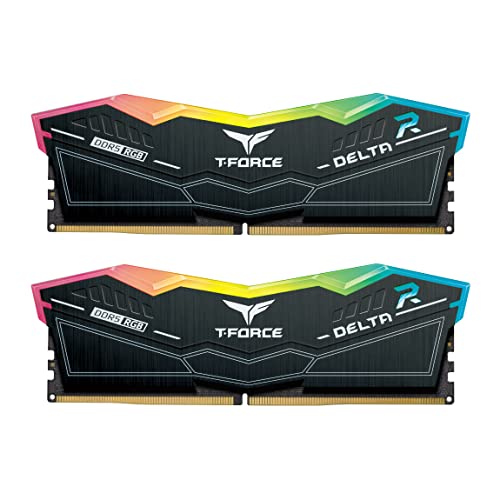
TEAMGROUP T-Force Delta RGB DDR5 32GB
- Fast 7200MHz DDR5 specification
- Useful 32GB capacity split across two 16GB modules
- Relatively tight CL34 rating for the stated speed
- XMP 3.0 ready for compatible platforms
- RGB design suits illuminated desktop builds
- Motherboard and processor support should be confirmed before using a 7200MHz profile
- The listing specifically targets 600 and 700 series chipsets, limiting its stated compatibility scope
- No detailed RGB control method or software support is listed

Crucial Pro 64GB DDR4-3200 Kit
- Large 64GB capacity for intensive multitasking
- Flexible 3200MHz, 3000MHz, and 2666MHz operation
- Broad listed support for Intel Core and AMD Ryzen platforms
- Intel XMP 2.0 support
- Two-module kit leaves additional memory slots open on four-slot motherboards
- CAS latency is not provided in the listing
- Non-ECC memory is not intended for systems that require ECC support
- Achieving the intended speed depends on processor and motherboard support, and some configurations may require XMP
Choosing a Kit for Your Editing PC
For a DDR4 desktop handling long projects, layered effects, and several creative applications, I would go with the Crucial Pro 64GB. Its two 32GB modules provide substantial working capacity, while support for 3200MHz, 3000MHz, or 2666MHz gives it flexibility across compatible Intel and AMD systems. Crucial also provides system-selection resources that can help confirm whether a particular motherboard supports the kit.
For a more typical DDR4 editing and gaming build, the Colorful DDR4 32GB is my balanced choice. It combines two 16GB modules with a 3200MHz rating and CL18 latency, and its XMP 2.0 profile simplifies reaching the advertised specification on supported boards. Anyone assembling a newer DDR5 system should instead consider the TEAMGROUP T-Force Delta, which pairs 32GB with a 7200MHz rating and CL34 latency. Confirm the memory generation first because, as our explanation of DDR4 and DDR5 motherboard compatibility covers, the two standards are not interchangeable.
FAQs
1. How much RAM is useful for video editing?
Capacity needs depend on footage resolution, project complexity, effects, and the number of applications open at once. A 32GB kit is a sensible target for many editing PCs, while 64GB offers more room for demanding timelines, large assets, and heavier multitasking. The motherboard and processor must support the selected capacity.
2. Is DDR5 always better than DDR4 for editing?
DDR5 provides higher available data rates, but it is not automatically the right upgrade for every editor. Your motherboard and processor determine which memory generation you can install. A well-sized DDR4 kit can still be the practical choice for an existing system, while DDR5 suits a compatible new build.
3. Should editors buy a dual-channel memory kit?
A matched two-module kit can enable dual-channel operation when installed in the correct motherboard slots, increasing available memory bandwidth compared with a single module on supported platforms. Check the motherboard manual for slot placement. Without working memory, a typical system cannot start normally, as explained in whether a motherboard can boot without RAM.
4. Does memory speed matter more than latency?
Neither specification should be considered alone. Higher transfer rates can improve bandwidth, while lower CAS latency at the same speed generally reduces memory access delay. For video editing, adequate capacity and platform compatibility usually deserve attention before small timing differences, especially when comparing kits from different DDR generations.
5. Do XMP and EXPO work on every motherboard?
No. XMP and EXPO profiles require support from the motherboard, processor, and firmware, and available options vary by platform. A kit may run at a standard fallback speed until its profile is enabled. Review the board’s memory support information before choosing a high-speed kit or changing firmware settings.
Editor’s Verdict
For the best RAM for video editing in a compatible DDR4 desktop, I would choose the Crucial Pro 64GB for its generous capacity and flexible supported speeds. Editors building a DDR5 machine and prioritizing a much higher rated data rate should consider the TEAMGROUP T-Force Delta instead.